0 ratings

Item #:
158106158
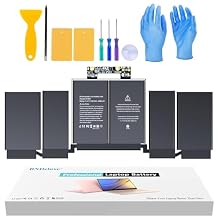
A1964LaptopBattery Replacement, A1989Battery for MacBook Pro 13" A1989 (Mid 2018 2019) A2251(2020 Release) EMC 3214 3358 3348 MR9Q2LL/A MR9R2LL/A
Item #:
158106158
ETB 7425
Price Details
Excluding Shipping & Custom charges ( Shipping and custom charges will be calculated on checkout )
*All items will import from US
0 ratings
Write a review
In stock
 Imported from USA store
QTY:
Order now and get it around Sunday, July 12
Secured transaction
Ubuy works hard to protect your security and privacy. Our advanced payment security system ensures confidentiality by encrypting your information during transmission using AES (Advanced Encryption Standards) and SSL (Secure Socket Layer) protocols. Your payment details are 100% secure as we do not share your payment details with third party sellers.
Our Top Logistics Partners


Bring your laptop back to life with our battery, you can enjoy the laptop qualities of your MacBook once again.

Fast
Shipping

Free
Return*

Secure Packaging

100% Original Products

PCI DSS Compliance

ISO 27001 Certified


Note: Step Down Voltage Transformer required for using electronics products of US store (110-120). Recommended power converters Buy Now.


What Stands Out
Compatibility
Designed specifically for MacBook Pro 13" models A1989 and A2251, ensuring perfect fit and seamless operation without compromising device functionality.
High Capacity
Equipped with high-capacity lithium cells, this battery replacement provides longer usage time, reducing downtime and extending productivity for users needing reliable performance.
Easy Installation
User-friendly design allows for straightforward installation, enabling even non-technical users to replace their laptop battery effortlessly without requiring professional help.
Product Details
| Item Weight | 1.5 lbs (680 grams) |
Dangerous Goods
To avoid the delay in customs clearance process for Dangerous Goods, the shipment shall be opened at our warehouse facility to check the severity of hazardous components. Please see the list of Dangerous goods here.
Who Should Buy?

-
Frequent Travelers
Ideal for users who travel often and need a reliable backup battery for their MacBook Pro.
-
Heavy Users
Perfect for professionals or students who require higher battery performance for extended periods.
-
Budget-Conscious
A cost-effective solution for users looking to replace their MacBook Pro battery without spending too much.

-
Casual Users
Not necessary for those who use their MacBook Pro infrequently and primarily plug it into power.
-
Older Models
Not suitable for MacBook Pro models outside the specified A1989 and A2251 series.
-
Technical Novices
Users who are not comfortable replacing a laptop battery may struggle with installation and technical requirements.
Product Description
A1964LaptopBattery Replacement, A1989Battery for MacBook Pro 13" A1989 (Mid 2018 2019) A2251(2020 Release) EMC 3214 3358 3348 MR9Q2LL/A MR9R2LL/A MR9T2LL/A MR9U2LL/A MR9V2LL/A MV962LL/A MV9A2LL/A
Have any Query? Chat with us
Customer Questions & Answers
-
Question:
What are the compatible models for the A1964, A1989, and A2251 laptop batteries?
Answer: The A1964, A1989, and A2251 laptop batteries are compatible with the MacBook Pro 13-inch models released in 2018, 2019, and 2020. Specifically, they fit models with the identifiers A1989, A1708, and A2251, as well as the EMC numbers 3214, 3348, and 3358. Choosing the correct battery not only ensures compatibility but also enhances device performance, as mismatched batteries can lead to operational issues. -
Question:
How do I install the A1964 or A1989 MacBook battery?
Answer: Installing the A1964 or A1989 battery involves a few steps: first, power down your MacBook Pro and remove it from any power source. Next, use appropriate tools to unscrew the bottom case, detach the old battery, and replace it with the new one. Finally, reassemble the bottom case. It's crucial to handle components delicately to avoid any damage. Consulting a video tutorial can also be beneficial for visual guidance during installation. -
Question:
How do I know if my MacBook needs a battery replacement?
Answer: Indicators that your MacBook may need a battery replacement include rapid battery drain, unexpected shutdowns under normal workloads, or difficulties charging. Additionally, you can check the battery health status in System Preferences -> Battery. A battery health percentage lower than 80% suggests it’s time for a replacement to maintain optimal performance. -
Question:
What is the typical lifespan of the A1989 MacBook battery?
Answer: The A1989 MacBook battery typically lasts around 1000 charge cycles, which translates to about two to four years depending on usage patterns. Factors such as high-intensity applications and frequent charging can shorten this lifespan. To extend battery longevity, managing settings like display brightness and energy preferences can be beneficial. -
Question:
Will replacing the battery improve my MacBook's performance?
Answer: Yes, replacing a worn-out battery can significantly enhance your MacBook's performance. A new battery ensures that your device maintains consistent power supply, which is vital for demanding applications and multitasking. Users often notice improvements in boot times, application launches, and overall responsiveness after battery replacement. -
Question:
Can I use a third-party battery for my MacBook Pro?
Answer: While third-party batteries may be more cost-effective, it’s essential to choose high-quality options from reputable brands. Poor-quality batteries might not fit correctly, provide subpar performance, or could even damage your device. Opting for OEM (original equipment manufacturer) batteries is typically recommended to ensure compatibility and safety. -
Question:
Where can I find replacement batteries for my MacBook Pro models A1964, A1989, or A2251?
Answer: You can purchase replacement batteries for your A1964, A1989, or A2251 models through various online platforms. A reliable source for these batteries is Ubuy in Ethiopia, which offers a wide selection of compatible batteries tailored for MacBook Pro models, ensuring that you receive a quality product suited for your needs. -
Question:
What tools do I need to replace the A1964 or A1989 battery?
Answer: You will need specific tools for replacing the A1964 or A1989 battery, including a P5 Pentalobe screwdriver for removing the bottom case and a T5 Torx screwdriver for the battery screws. Additionally, a plastic spudger can help in safely disengaging the battery connectors. Having a clean workspace and proper lighting will facilitate the process. -
Question:
Are there any safety precautions to take before replacing the MacBook battery?
Answer: Before replacing your MacBook battery, ensure you power down the device and disconnect from any power source. It’s crucial to discharge the battery below 25% to avoid potential hazards and to wear an anti-static strap or work on an anti-static mat to prevent static damage to internal components. Avoid any metallic tools near the logic board for added safety. -
Question:
Can I recycle my old MacBook battery?
Answer: Yes, recycling your old MacBook battery is an environmentally responsible action. Many retail locations and electronic stores offer battery recycling programs to ensure proper disposal. Always check local guidelines in your area or use designated e-waste collection events to handle batteries safely.
BNDeluxe Batteries Editorial Review
No editorial reviews found
Customer Reviews & Ratings
1 customers ratings
-
5 Star
100%
-
4 Star
0%
-
3 Star
0%
-
2 Star
0%
-
1 Star
0%
Review this product
Share your thoughts with other customers
Platform Trust & Buyer Confidence

MT
Mohd
Verified buyer
“The product received very good packaging & safe…Thank You”
16 June 2026 · via Trustpilot
SJ
Shawati
Verified buyer
“Accurate delivery timing given”
16 June 2026 · via Trustpilot
YB
Youcef
Verified buyer
“Not madly expensive like I thought, and much quicker than promised.”
15 June 2026 · via Trustpilot
LM
Leila
Verified buyer
“Never dealt with Ubuy before, but everything worked out great. Seamless cross border purchasing and shipping. Thanks!”
6/7/2026 · via Trustpilot
KA
Kwame
Verified buyer
“The process was smooth, with clear communication and timelines. This was my 1st purchase and I am really impressed. I will definitely be coming back.”
12 June 2026 · via Trustpilot
Secure Checkout
Global Delivery
Easy Returns
Genuine Products
Product Price History
Important information
- Limitations : For products shipped internationally, please note that any manufacturer warranty may not be valid; manufacturer service options may not be available; product manuals, instructions, and safety warnings may not be in destination country languages; the products (and accompanying materials) may not be designed in accordance with destination country standards, specifications, and labeling requirements; and the products may not conform to destination country voltage and other electrical standards (requiring use of an adapter or converter if appropriate). The recipient is responsible for assuring that the product can be lawfully imported to the destination country. When ordering from Ubuy or its affiliates, the recipient is the importer of record and must comply with all laws and regulations of the destination country.
- Not all the products listed on Ubuy are for sale, as Ubuy is a global search engine. Products are subject to export/trade regulations.
ETB 7425
Order now and get it around Sunday, July 12
This item is not restrict in my country.(Please click on above link if this item is not restrict in your country, So our team will review and allow.)
QTY:
Secured transaction
PCI DSS compliant and ISO 27001:2022 certified, with encrypted payments and full buyer protection on every order.
Our Top Logistics Partners
Fastest cross-border delivery
Features & Benefits
- High-quality replacement battery for various MacBook Pro models.
- Compatible with 13-inch MacBook Pro (2018, 2019, 2020).
- Built-in multi-protection functions ensure maximum safety.
- 100% compatible with OEM specifications for easy installation.
- Smart chip for temperature control maintains high performance.
- Grade A cells for fast charging and low power consumption.
Ubuy Assurance
Experience worry-free shopping with 100% original products, PCI DSS-compliant payment security, ISO 27001-certified data protection, the fastest cross-border delivery, free returns *, and secure packaging on every order.