


0 ratings
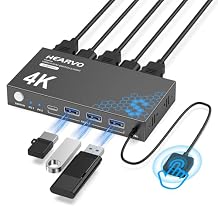
USB 3.0 HDMI KVM Switch 1 Monitors 2 Computers, 4K@60Hz KVM Switches for 2 Computers Sharing Monitor Keyboard Mouse Hard Drives Printer, with EDID Adaptive, 2USB Cable and Controller -S7232H
This KVM Switch is complete USB switch and HDMI switch rolled into one, allowing seamless control of two computers with a single monitor.
USB 3.0 HDMI KVM Switch 1 Monitors 2 Computers, 4K@60Hz KVM Switches for 2 Computers Sharing Monitor Keyboard Mouse Hard Drives Printer, with EDID Adaptive, 2USB Cable and Controller -S7232H
Item #: 87703644

USB 3.0 HDMI KVM Switch 1 Monitors 2 Computers, 4K@60Hz KVM Switches for 2 Computers Sharing Monitor Keyboard Mouse Hard Drives Printer, with EDID

Item #: 87703644

ETB 14282

Price Details

Excluding Shipping & Custom charges ( Shipping and custom charges will be calculated on checkout )

*All items will import from US

0 ratings Write a review
Out of stock
us Imported from USA store
Our Top Logistics Partners
  • fedex
  • dhl
This KVM Switch is complete USB switch and HDMI switch rolled into one, allowing seamless control of two computers with a single monitor.
U-Care Warranty:
None
Select a Plan
fast shipping

Fast
Shipping

free return

Free
Return*

secure packaging

Secure Packaging

100% original products

100% Original Products

pci-dss

PCI DSS Compliance

iso certified

ISO 27001 Certified


paypal payment
visa payment
mastercard payment
Note: Step Down Voltage Transformer required for using electronics products of US store (110-120). Recommended power converters Buy Now.

What Stands Out

High Resolution
This KVM switch supports 4K@60Hz video resolution, ensuring crystal-clear image quality for an immersive experience in gaming, video editing, and professional presentations.
Multiple Devices
Seamlessly connect and control two computers with one monitor, keyboard, and mouse setup, enhancing workspace efficiency and minimizing cable clutter for users with multiple systems.
User-Friendly
The included controller allows for easy switching between computers, while EDID adaptive technology optimizes display settings automatically, providing a hassle-free user experience.

Product Details

Shop USB 3.0 HDMI KVM Switch 1 Monitors 2 Computers, 4K@60Hz KVM Switches for 2 Computers Sharing Monitor Keyboard Mouse Hard Drives Printer, with EDID Adaptive, 2USB Cable and Controller -S7232H online at a best price in Ethiopia. B0D5D24GQJ
Item Weight1.5 lbs (680 grams)

Who Should Buy?

Suitable For
  • Dual Computer Users

    Ideal for users needing to switch between two computers while using one monitor, keyboard, and mouse seamlessly.

  • High-Resolution Work

    Perfect for professionals working with 4K video or graphics who need high-quality visuals and fast data transfer.

  • Office Settings

    Great for shared workstations where multiple users need access to the same monitor, keyboard, and mouse equipment.

Not Suitable For
  • Gaming Enthusiasts

    Not the best choice for gamers who require ultra-fast response times and dedicated equipment for each gaming setup.

  • Single Computer Use

    Not suitable for users who only need to connect one computer, as it offers limited advantages in this scenario.

  • Casual Users

    Best features may be excessive for casual users who don't require advanced functionalities like 4K support or KVM switching.

Product Description

USB 3.0 HDMI KVM Switch 1 Monitors 2 Computers, 4K@60Hz KVM Switches for 2 Computers Sharing Monitor Keyboard Mouse Hard Drives Printer, with EDID Adaptive, 2USB Cable and Controller -S7232H

Have any Query? Chat with us

Customer Questions & Answers

  • Question: What is a USB 3.0 HDMI KVM Switch?

    Answer: A USB 3.0 HDMI KVM Switch allows you to control two computers using a single monitor, keyboard, and mouse setup. This device simplifies your workspace by enabling seamless switching between computers without the hassle of multiple peripherals. It supports high-definition video output up to 4K at 60Hz, ensuring that you maintain excellent visual quality. Users often benefit from such a switch in environments where dual systems are necessary, like video editing or programming, making it an essential tool for multitaskers.
  • Question: How does the KVM switch support 4K@60Hz?

    Answer: The KVM switch's 4K@60Hz support means it can transmit video at a resolution of 3840x2160 pixels at 60 frames per second. This is made possible through advanced HDMI technology combined with the bandwidth capabilities of USB 3.0. Gamers, graphic designers, and video professionals can particularly appreciate this feature as it allows for smoother visuals and a higher level of detail, enhancing the overall experience whether for work or leisure.
  • Question: What types of devices can be connected with this KVM switch?

    Answer: This KVM switch is compatible with various devices, including laptops, desktop computers, printers, and other peripherals. You can connect two computers and easily share them with the same monitor, keyboard, and mouse. This versatility supports diverse setups, such as dual-monitor configurations or workstations where efficiency is key, making it ideal for professionals who switch between different systems regularly.
  • Question: Can I use the KVM Switch with different operating systems?

    Answer: Yes, the KVM switch works across different operating systems, including Windows, macOS, and Linux. This compatibility allows users to connect computers with various configurations, making it a fantastic tool for those who may be managing both a personal and a work computer, or transitioning between testing environments for development purposes. The switch provides flexibility, catering to users who operate in multi-platform settings.
  • Question: What is EDID, and how does it benefit users of a KVM switch?

    Answer: EDID stands for Extended Display Identification Data. It allows the KVM switch to communicate with connected devices to optimize the resolution and refresh rate settings automatically. This functionality ensures that the best display settings are used, which can significantly enhance user experience by preventing issues like blurry images or incorrect resolutions. Users who frequently change display settings will find this feature particularly beneficial.
  • Question: How do I switch between the two computers?

    Answer: Switching between the two computers connected to the KVM switch can typically be done via a push-button mechanism, a keyboard shortcut, or an on-screen menu. This convenient method allows users to quickly toggle their control without needing to physically disconnect any cables. It's particularly useful in fast-paced environments like software development or tech support, where rapid access to each system is required.
  • Question: Is the KVM switch plug and play?

    Answer: Yes, most USB 3.0 HDMI KVM switches are designed to be plug and play, requiring no additional software installations or configurations. Simply connect the switch to your computers and peripherals, and you can start using it immediately. This feature is beneficial for users who prefer a hassle-free setup, making it a time-saving solution for both home and office environments.
  • Question: Will this KVM switch work with USB hubs?

    Answer: Yes, the KVM switch can work with USB hubs. This functionality allows you to expand the number of USB devices you can connect to the KVM switch, enabling you to share multiple peripherals like printers, external drives, or scanners across both computers. It’s useful in managing a sophisticated workstation, ensuring everything you need is readily accessible without needing constant reconnections.
  • Question: Where can I buy the USB 3.0 HDMI KVM Switch?

    Answer: You can purchase the USB 3.0 HDMI KVM Switch from Ubuy in Ethiopia. Ubuy offers a variety of tech products and provides a user-friendly shopping experience, making it easy to find exactly what you need. Whether you're a professional needing efficient multi-computer management or someone looking to optimize their home office setup, Ubuy is a reliable option.
  • Question: Can this KVM switch support gaming?

    Answer: Yes, the KVM switch is suitable for gaming, especially given its support for 4K resolution at 60Hz, which provides a high-quality gaming experience. Gamers can seamlessly switch between systems while maintaining performance and visual fidelity. This feature is great for those who have a dedicated gaming rig and a work computer, allowing easy access for both gaming and productivity without sacrificing quality.

Hearvo Editorial Review

**** The USB 3.0 HDMI KVM switch has garnered a positive reception from users who appreciate its functionality and affordability. Many reviews highlight the seamless switching capabilities between multiple computers, which is especially beneficial for those who need to switch frequently throughout the day. The compact design, measuring just 2.5" by 4.5", Conserves desk space while maintaining a convenient and organized workspace. Users have noted impressive performance with 2K resolution, and even those with 4K capabilities found the visuals to be top-notch. The addition of ultra-fast USB 3.0 ports for sharing peripherals, along with a straightforward plug-and-play setup, has made it a favorite among multitaskers. Many appreciate the build quality, as the aluminum Construction feels solid and durable. However, some users encountered occasional audio issues when switching between devices, although these were often resolved easily. Others experienced compatibility problems with certain laptops due to the reliance on a single USB-C port, stressing the importance of ensuring device compatibility before purchasing. Overall, the KVM switch stands out for its value, user-friendliness, and customer support, with the majority recommending it for similar setups. **

Customer Reviews & Ratings

5.0
1 customers ratings
  • 5 Star
    100%
  • 4 Star
    0%
  • 3 Star
    0%
  • 2 Star
    0%
  • 1 Star
    0%

Review this product

Share your thoughts with other customers

Pros

  • Seamless and fast switching between two computers.
  • Compact design saves desk space.
  • Impressive 2K resolution and great visual clarity.
  • Ultra-fast USB 3.0 ports for easy peripheral sharing.
  • Plug-and-play setup with no additional power supplies required.
  • Sturdy aluminum build quality.
  • Excellent customer support experience.

Cons

  • Compatibility concerns with specific laptops dependent on USB-C.

Product Price History

Important information

  • Limitations : For products shipped internationally, please note that any manufacturer warranty may not be valid; manufacturer service options may not be available; product manuals, instructions, and safety warnings may not be in destination country languages; the products (and accompanying materials) may not be designed in accordance with destination country standards, specifications, and labeling requirements; and the products may not conform to destination country voltage and other electrical standards (requiring use of an adapter or converter if appropriate). The recipient is responsible for assuring that the product can be lawfully imported to the destination country. When ordering from Ubuy or its affiliates, the recipient is the importer of record and must comply with all laws and regulations of the destination country.
  • Not all the products listed on Ubuy are for sale, as Ubuy is a global search engine. Products are subject to export/trade regulations.