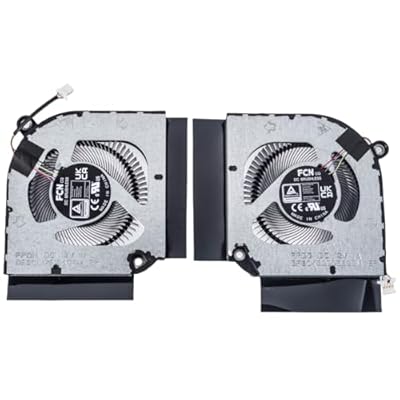
Laptop CPUGPU Cooling Fan for Acer Predator Helios 300 PH317-55 PH315-55 PH317-56 Nitro 5 AN515-58 AN517-55 N22C1 AN515-58-51R3 AN16-41 AN16-51
ETB 1051490
Price Details
Excluding Shipping & Custom charges ( Shipping and custom charges will be calculated on checkout )
*All items will import from US
Ubuy works hard to protect your security and privacy. Our advanced payment security system ensures confidentiality by encrypting your information during transmission using AES (Advanced Encryption Standards) and SSL (Secure Socket Layer) protocols. Your payment details are 100% secure as we do not share your payment details with third party sellers.
All laptop fans are TESTED rigorously before shipping.
Fast
Shipping
Free
Return*
Secure Packaging
100% Original Products
PCI DSS Compliance
ISO 27001 Certified
What Stands Out
Product Details
| Item Weight | 0.5 lbs (230 grams) |
Who Should Buy?
-
Gaming Enthusiasts
Ideal for gamers using Acer Predator and Nitro series laptops, requiring enhanced cooling for prolonged gaming sessions.
-
Content Creators
Beneficial for video editors and graphic designers needing reliable cooling to prevent thermal throttling during intensive tasks.
-
Frequent Travelers
Perfect for users requiring a portable cooling solution for laptops that may overheat during travel or outdoor use.
-
Budget Users
Not ideal for cost-sensitive users who may prefer lower-cost alternatives for laptop cooling solutions.
-
Basic Users
Unsuitable for casual users or students who do not require advanced cooling features for light computing tasks.
-
Non-Acer Laptops
This fan is not compatible with laptops outside the specified Acer series, limiting its usability for other brands.
Product Description
Laptop CPUGPU Cooling Fan for Acer Predator Helios 300 PH317-55 PH315-55 PH317-56 Nitro 5 AN515-58 AN517-55 N22C1 AN515-58-51R3 AN16-41 AN16-51 AN17-41 AN17-42 N23Q4 Series FPDG FPDH 12V
Customer Questions & Answers
-
Question:
What are the signs that my Acer Predator Helios 300 needs a new cooling fan?
Answer: If you notice your laptop running unusually hot, frequent overheating, or excessive fan noise, it may indicate that the CPU and GPU cooling fan is failing. These symptoms can lead to performance issues and potential hardware damage. Generally, gaming laptops like the Acer Predator require optimal cooling due to their powerful components. If you play graphics-intensive games or run demanding applications, ensure that the cooling fan is functioning properly and consider inspecting or replacing it for better performance. -
Question:
How do I install the cooling fan for my Acer Nitro 5?
Answer: Installing a new cooling fan for your Acer Nitro 5 involves several steps. First, ensure the laptop is powered off and unplugged. Access the internals by removing the back panels with appropriate tools. Disconnect the old fan, carefully clean the area, and attach the new fan by connecting the cables and securing it in place. This process helps improve airflow and cooling efficiency, crucial for maintaining optimal performance during resource-heavy tasks or gaming sessions. -
Question:
Is the replacement cooling fan compatible with all models of Acer Predator Helios 300?
Answer: The cooling fan designed for the Acer Predator Helios 300 is specifically tailored to fit model numbers PH317-55, PH315-55, PH317-56, among others. Compatibility is key to ensure proper fitting and performance. It's essential to verify your laptop's model before making a purchase, to guarantee a seamless integration that will effectively manage temperatures during heavy use and keep your device performing at its best. -
Question:
What should I consider when buying a cooling fan for gaming laptops?
Answer: When purchasing a cooling fan for gaming laptops, like the Acer Nitro series, consider factors such as compatibility, airflow efficiency, and noise levels. A fan that provides optimal airflow can enhance cooling, which is essential for preventing thermal throttling during intense gaming. Look for product reviews and specifications to ensure you're selecting a high-quality replacement that meets the demands of your laptop's performance without being overly noisy. -
Question:
How often should I replace the cooling fan in my laptop?
Answer: Replacement frequency for laptop cooling fans can depend on usage, typically every few years or sooner if performance issues arise. Dust buildup, overheating, or increased noise can signal it's time for a change. Regular maintenance, including cleaning and occasional checks, can prolong the lifespan of the fan. Proper ventilation and care can also ensure it continues to function effectively, supporting the laptop's performance during intense tasks. -
Question:
Can using a cooling pad help with my laptop's temperatures?
Answer: Yes, using a cooling pad can significantly improve your laptop's thermal performance, especially during heavy gaming or multitasking. These pads provide additional airflow, supplementing the internal cooling system. While they do not replace the need for a functional cooling fan, they can help lower temperatures and reduce the workload on the fan, potentially extending its life and improving overall performance. -
Question:
What are the benefits of replacing a faulty cooling fan?
Answer: Replacing a faulty cooling fan offers multiple benefits, including improved airflow, reduced overheating, and enhanced component longevity. This is crucial for maintaining optimal performance in demanding tasks and ensuring the laptop runs smoothly. Moreover, a new fan can minimize noise levels, providing a quieter working or gaming environment. Overall, addressing a malfunctioning fan is key to preserving your laptop's capabilities and user experience. -
Question:
How do I find the right cooling fan for my Nitro 5 model?
Answer: To find the right cooling fan for your Nitro 5, first check the model number, which can usually be found on the bottom of the laptop or in the system settings. Once you have that information, browse trusted e-commerce platforms for compatible parts, ensuring that the specifications match your device's requirements. This careful selection process ensures optimal performance while preventing further issues related to overheating. -
Question:
Does the cooling fan require any special maintenance?
Answer: Yes, maintaining your laptop's cooling fan is essential for optimal performance. Regularly cleaning the fan and airflow vents helps prevent dust buildup, which can hinder performance and cause overheating. Use compressed air to gently remove debris and maintain airflow efficiency. Such proactive care can extend the lifespan of the cooling fan while ensuring your laptop remains functional during intensive tasks like gaming or video editing. -
Question:
Where can I buy Laptop CPU+GPU Cooling Fan for Acer Predator Helios and Nitro models in Ethiopia?
Answer: You can purchase the Laptop CPU+GPU Cooling Fan for Acer Predator Helios 300 and Nitro models exclusively on Ubuy in Ethiopia. Ubuy offers a wide selection of compatible fans ensuring optimal performance for your laptop. Their platform also provides easy navigation to find the right part for your specific model among various options, making it a reliable choice for quality laptop accessories.
QRFAX CPU Cooling Fans Editorial Review
Customer Reviews & Ratings
-
5 Star
100%
-
4 Star
0%
-
3 Star
0%
-
2 Star
0%
-
1 Star
0%
Review this product
Share your thoughts with other customers
Pros
- Efficient cooling performance
- Easy to install
- Quiet operation
- Durable build quality
- Compatible with multiple models
Cons
- Slightly heavier than expected
Product Price History
Important information
- Limitations : For products shipped internationally, please note that any manufacturer warranty may not be valid; manufacturer service options may not be available; product manuals, instructions, and safety warnings may not be in destination country languages; the products (and accompanying materials) may not be designed in accordance with destination country standards, specifications, and labeling requirements; and the products may not conform to destination country voltage and other electrical standards (requiring use of an adapter or converter if appropriate). The recipient is responsible for assuring that the product can be lawfully imported to the destination country. When ordering from Ubuy or its affiliates, the recipient is the importer of record and must comply with all laws and regulations of the destination country.
- Not all the products listed on Ubuy are for sale, as Ubuy is a global search engine. Products are subject to export/trade regulations.
ETB 1051490
Currently unavailable.
We don't know when or if this item will be back in stock.
This item is not restrict in my country.(Please click on above link if this item is not restrict in your country, So our team will review and allow.)
Ubuy works hard to protect your security and privacy. Our advanced payment security system ensures confidentiality by encrypting your information during transmission using AES (Advanced Encryption Standards) and SSL (Secure Socket Layer) protocols. Your payment details are 100% secure as we do not share your payment details with third party sellers.
Features & Benefits
- Brand new replacement cooling fan for laptops.
- Compatible with various Acer Predator and Nitro models.
- 4-pin, 4-wire connector for easy installation.
- Includes a reliable CPU and GPU cooling solution.
- Rigorously tested to ensure high performance and durability.
- Check compatibility with your model before purchasing.


