- Home Page /
- Electronics /
- Computer Accessories /
- Computer Accessories & Peripherals /
- Input Devices /
- Graphics Tablets /
- Graphics Drawing Tablet 8.26 5.5 Inches Ergo...
0 ratings

Item #:
85822985
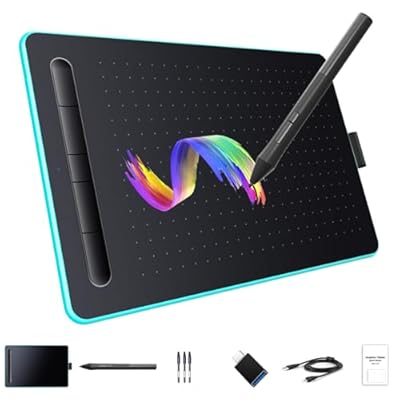
Graphics Drawing Tablet 8.26 5.5 Inches Ergonomic 8192 Levels Battery-Free Stylus Pen Tablet 5 Customized Shortcut Keys Compatible with
Item #:
85822985
ETB 6571
Price Details
Excluding Shipping & Custom charges ( Shipping and custom charges will be calculated on checkout )
*All items will import from US
0 ratings
Write a review
Out of stock
 Imported from USA store
Secured transaction
Ubuy works hard to protect your security and privacy. Our advanced payment security system ensures confidentiality by encrypting your information during transmission using AES (Advanced Encryption Standards) and SSL (Secure Socket Layer) protocols. Your payment details are 100% secure as we do not share your payment details with third party sellers.
Our Top Logistics Partners


Regain the feeling of drawing on paper with a pen, perfect for both budding artists and seasoned teachers.

Fast
Shipping

Free
Return*

Secure Packaging

100% Original Products

PCI DSS Compliance

ISO 27001 Certified


Note: Step Down Voltage Transformer required for using electronics products of US store (110-120). Recommended power converters Buy Now.


What Stands Out
Ergonomic Design
Designed for comfort, the tablet's ergonomic shape prevents strain during long drawing sessions, making it ideal for teachers, students, and creators.
8192 Levels Sensitivity
With 8192 levels of pressure sensitivity, this drawing tablet allows for precise and nuanced strokes, enhancing creativity and control for artists of all skill levels.
Customizable Shortcuts
Equipped with five customizable shortcut keys, users can streamline their workflow, improving productivity and flexibility when creating digital art or preparing educational content.
Product Details
| Item Weight | 1.5 lbs (680 grams) |
Dangerous Goods
To avoid the delay in customs clearance process for Dangerous Goods, the shipment shall be opened at our warehouse facility to check the severity of hazardous components. Please see the list of Dangerous goods here.
Who Should Buy?

-
Art Students
Perfect for students in art disciplines who need a reliable tablet for drawing and illustrating digitally.
-
Online Educators
Ideal for teachers offering online classes who require an effective tool to create visual content and engage students.
-
Graphic Designers
Suitable for designers needing precision and customizable options to enhance workflow in design projects.

-
Beginners
May be overwhelming for novice users without a basic understanding of drawing tablets and software.
-
Non-Digital Artists
Traditional artists who prefer pen-on-paper methods might not find this tablet suitable for their workflow.
-
Heavy Gamers
Gamers not interested in drawing or design applications might not utilize the tablet's features effectively.
Product Description
Graphics Drawing Tablet 8.26 5.5 Inches Ergonomic 8192 Levels Battery-Free Stylus Pen Tablet 5 Customized Shortcut Keys Compatible with WindowsAndroid for Teachers Students Creators
Have any Query? Chat with us
Customer Questions & Answers
-
Question:
What systems is the drawing pad compatible with?
Answer: The drawing pad is compatible with Windows, Mac OS, and Android systems, making it versatile for various users. Whether you're an artist using a laptop, a graphic designer working on a Mac, or a student sketching on a tablet, this compatibility ensures seamless integration. This versatility allows for a broad range of applications, from digital art creation to note-taking, enhancing productivity across devices. -
Question:
How does the 8192-level pressure sensitivity enhance drawing experience?
Answer: The 8192-level passive pressure sensitivity pen provides a highly responsive and nuanced drawing experience. This level of sensitivity allows for precise control over line thickness and opacity, closely mimicking traditional drawing tools. Artists can create intricate details or broad strokes with ease, making it ideal for both professional artworks and casual sketches, enhancing engagement for any creative task. -
Question:
Is the drawing pad ergonomically designed, and why is that important?
Answer: Yes, this drawing pad is ergonomically designed to provide a comfortable experience during long creative sessions. An ergonomic setup reduces strain on your wrists and forearms, promoting better posture. This thoughtful design is crucial for artists and designers who spend extended hours sketching, as it helps to enhance focus and prevent fatigue, ultimately improving the quality of your work. -
Question:
What are the advantages of using a passive stylus pen?
Answer: The passive stylus pen offers several advantages, such as requiring no batteries and providing a lightweight feel. This type of pen is often praised for its reliability and precision, making it an excellent choice for artists. Additionally, without the need for charging, users can focus on their work without interruptions, making it a practical tool for both hobbyists and professionals alike. -
Question:
Can I use this drawing pad for activities other than drawing?
Answer: Absolutely! While primarily designed for drawing and illustrating, this drawing pad can also be used for note-taking, photo editing, and animation. Its compatibility with various software applications enables users to perform a wide range of tasks. For instance, students can take digital notes during lectures, while photographers can use the pad for detailed photo retouching, showcasing its versatility beyond just art. -
Question:
What are the dimensions of the drawing pad?
Answer: The drawing pad measures 8.26 x 5.5 inches, making it a compact and portable option. This size is perfect for both desk use and on-the-go creativity. Artists can easily fit it into a backpack, allowing them to draw anywhere, whether at home or in a coffee shop. Additionally, this size offers enough space for detailed work without overwhelming the workspace. -
Question:
Is there any software included with the drawing pad?
Answer: Generally, drawing pads come with access to various software compatible with digital art. While specific software can vary, many brands offer trials or versions of popular programs such as Corel Painter, Adobe Photoshop, or drawing applications suitable for beginners. This allows users to explore their artistic skills right out of the box, catering to both novice and experienced creators. -
Question:
What makes this drawing pad suitable for beginners?
Answer: The drawing pad is ideal for beginners due to its user-friendly features and ergonomic design. Its simple setup allows new users to start creating without a steep learning curve. Additionally, the pressure-sensitive pen enables beginners to practice techniques without needing advanced skills, fostering confidence and creativity as they explore their artistic talents. -
Question:
Can the drawing pad be used with graphic design software?
Answer: Yes, this drawing pad can seamlessly integrate with popular graphic design software like Adobe Illustrator and Photoshop. The precision and pressure sensitivity of the stylus allow designers to create intricate designs and illustrations effortlessly. Users can enhance their workflow, improving both efficiency and creativity, whether they are working on logos, digital painting, or any graphic design projects. -
Question:
Where can I buy the drawing pad in Ethiopia?
Answer: You can conveniently purchase the drawing pad from Ubuy in Ethiopia. Ubuy offers a wide selection of tech products, including this drawing pad, ensuring that you can find what you need with ease. Their user-friendly platform makes it simple to order your preferred items, all while providing comprehensive information about the products available.
LetSketch Graphics Tablets Editorial Review
**** The customer experience with this product, a graphic tablet, presents a mixed bag of feedback that skews negatively, particularly for Mac users. Many reviewers reported significant struggles with driver installation and compatibility, noting that links provided in the instructions often led to dead ends. This difficulty was a recurrent theme, with some users unable to get any features working on Mac systems at all, particularly the essential left-click function. Users acknowledged the tablet's comfort and reasonable size for both college work and digital art, which prompted some to praise its value at a low price point. However, this positive sentiment was often dampened by complaints about low-quality materials, with reports of the device cracking easily after minimal use. Additionally, while some Mac users found limited success with the tablet, comments indicated that the experience might be significantly better on Windows machines, suggesting that the product may be more suited for a PC environment. Moreover, support from the seller seemed lacking, with responses failing to address many technical issues adequately—a frustration shared by multiple customers. In conclusion, while the tablet could be Considered a good budget option for casual use, it falls short in quality and usability, particularly for Mac users, and appears most effective with Windows setups. **
Customer Reviews & Ratings
1 customers ratings
-
5 Star
0%
-
4 Star
100%
-
3 Star
0%
-
2 Star
0%
-
1 Star
0%
Review this product
Share your thoughts with other customers
Pros
- Comfortable and good size for use.
- Affordable price point.
- Can be suitable for college and digital art applications.
Cons
- Poor build quality, with reports of cracking after minimal use.
Product Price History
Important information
- Limitations : For products shipped internationally, please note that any manufacturer warranty may not be valid; manufacturer service options may not be available; product manuals, instructions, and safety warnings may not be in destination country languages; the products (and accompanying materials) may not be designed in accordance with destination country standards, specifications, and labeling requirements; and the products may not conform to destination country voltage and other electrical standards (requiring use of an adapter or converter if appropriate). The recipient is responsible for assuring that the product can be lawfully imported to the destination country. When ordering from Ubuy or its affiliates, the recipient is the importer of record and must comply with all laws and regulations of the destination country.
- Not all the products listed on Ubuy are for sale, as Ubuy is a global search engine. Products are subject to export/trade regulations.
ETB 6571
Currently unavailable.
We don't know when or if this item will be back in stock.
This item is not restrict in my country.(Please click on above link if this item is not restrict in your country, So our team will review and allow.)
Secured transaction
Ubuy works hard to protect your security and privacy. Our advanced payment security system ensures confidentiality by encrypting your information during transmission using AES (Advanced Encryption Standards) and SSL (Secure Socket Layer) protocols. Your payment details are 100% secure as we do not share your payment details with third party sellers.
Our Top Logistics Partners
Fastest cross-border delivery
Features & Benefits
- Passive electromagnetic induction technology for an authentic drawing experience.
- 8192 levels of pressure sensitivity and 5080 LPI resolution for precise control.
- Easy plug and play setup with no drivers required for many systems.
- Customizable shortcut keys enhance user efficiency for drawing or office tasks.
- Durable polycarbonate design offering high strength and easy cleaning.
- Ideal for children's drawing applications and multimedia teaching.