- Home Page /
- Electronics /
- Computer Accessories /
- Laptop Accessories /
- Cooling Pads & External Fans /
- Cooling Pads /
- Cooling Pad for GIGABYTE AORUS 17X 16X 17 15 ...
0 ratings




Item #:
89563581
Cooling Pad for GIGABYTE AORUS 17X 16X 17 15 15P Master 16 18 AERO 15 16 17 14 G5 KF5 G6 KF 14-18 inch Gaming Laptop,It is a Well Deserved Heat
Item #:
89563581
ETB 19294
Price Details
Excluding Shipping & Custom charges ( Shipping and custom charges will be calculated on checkout )
*All items will import from US
0 ratings
Write a review
In stock
 Imported from USA store
QTY:
Order now and get it around Thursday, July 09
Secured transaction
Ubuy works hard to protect your security and privacy. Our advanced payment security system ensures confidentiality by encrypting your information during transmission using AES (Advanced Encryption Standards) and SSL (Secure Socket Layer) protocols. Your payment details are 100% secure as we do not share your payment details with third party sellers.
Our Top Logistics Partners


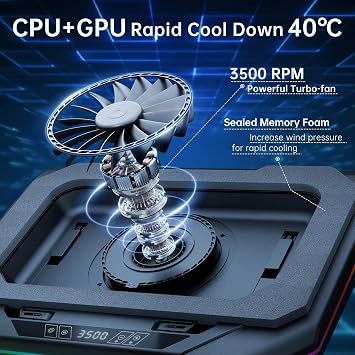
Rapid Heat Dissipation--Super Powerful Turbofan(800-3500 RPM) with Sealed Wind Pressure Reduces CPU+GPU Temperature By 40 Degrees in 90 Seconds.

Fast
Shipping

Free
Return*

Secure Packaging

100% Original Products

PCI DSS Compliance

ISO 27001 Certified


Note: Step Down Voltage Transformer required for using electronics products of US store (110-120). Recommended power converters Buy Now.


What Stands Out
Turbo Cooling Fan
The powerful turbo cooling fan rapidly decreases CPU and GPU temperatures by up to 40°C, ensuring optimal performance during intense gaming sessions, thus preventing overheating and throttling.
Variable Speed Control
Customized cooling experience with adjustable fan speeds allows users to balance noise levels and cooling efficiency based on gaming demands, providing tailored performance that suits various gameplay conditions.
RGB Lighting
The six dynamic RGB lights add an aesthetic flair while gaming, enhancing your setup's visual appeal and allowing for personalized customization to suit gamer preferences and moods.
Product Details
- A good product can only be known by experiencing it yourself. This cooling pad, which can be called a heat dissipation monster, is designed specifically for gaming laptops and can fully reach the level you want, even higher. Its appearance is cool and high-end, and it is obvious that it is not a cheap item and worth owning. Rapid Heat Dissipation--Super Powerful Turbofan(800-3500 RPM) with Sealed Wind Pressure Reduces CPU+GPU Temperature By 40 Degrees in 90 Seconds(Different Laptop May Have Different Cooling Effects). Quickly Solve Laptop Heating Problems, Improve Laptop Performance, and Make Laptop Work More Smoothly.
- Multiple Patented Designs--Retractable Side Panels Prevent The Laptop From Slipping. Foldable Footrests Supports Compatibility with Laptops of Different Sizes Ranging From 14 to 18 inches , Gaming Laptop, Office Laptop USB HUB--Built-in 1 Type-C Data Input Port 3 USB HUB Data Transmission Port, Can Connect External Devices Such As Keyboards, Mouse, and Portable Hard Drives etc.
- RGB Colorful Lighting--RGB Surround Light Strip with 6 Adjustable Lighting Modes. Memory Mode Settings, Cool Lighting Effects, Full gaming Atmosphere. Power Supply: 12V 1.5A 18W Adapter Provide Sufficient Power to Make the Fan Stronger and Charge More Effectively. The Special Air Duct Design Reduces Noise 30-60 dB.
- ❌【Choose carefully for noise-sensitive users】 is a well-deserved performance monster. It uses industrial-grade turbofans,The higher the speed, the better the cooling effect, and the greater the noise, so its noise can reach 60 dB at the highest speed. People’s normal conversation is about 50dB,If you are sensitive to noise, please buy carefully
- ❌ be careful ❌: When playing games or working under high loads, turning on the laptop cooling pad function can quickly cool down if the computer heats up. When the laptop is working normally, the cooling function of the cooler should also be turned on. You can lower its speed to keep it quiet. If you don't want to turn on the cooling pad, you need to move it away, otherwise the heat from the computer won't dissipate
| Brand | PHAPPY |
| Manufacturer | PHAPPY |
| Number of Fans | 1 |
| Color | Black |
| Enclosure Material | Acrylonitrile Butadiene Styrene (ABS) |
| Cooling Method | Air |
| Item Dimensions L x W x H | 16.88"L x 12.88"W x 2.7"H (42.9 x 32.7 x 6.9 cm) |
| Material | Acrylonitrile Butadiene Styrene (ABS) |
| Product Dimensions (L x W x H) | 16.88"L x 12.88"W x 2.7"H (42.9 x 32.7 x 6.9 cm) |
| Country of Origin | This item will be imported from US |
| What is in the box | Cooling Pad for GIGABYTE... For more details, please check description/product details |
Who Should Buy?

-
Gaming Enthusiasts
Ideal for gamers needing efficient cooling during extended gaming sessions to maintain performance and prevent overheating.
-
High-Performance Users
Perfect for users running demanding applications like video editing or 3D rendering, requiring additional cooling for CPUs and GPUs.
-
Aesthetic Seekers
Great for users who appreciate RGB lighting, enhancing the visual appeal of their gaming laptop setup.

-
Casual Users
Not suitable for casual users who do not require significant cooling, as it may be overkill for light tasks.
-
Portable Gamers
Not ideal for gamers needing a portable solution, as this cooling pad could be bulky for on-the-go usage.
-
Budget Shoppers
May not be the best fit for budget-conscious consumers seeking less expensive cooling solutions for casual gaming.
Product Description
Have any Query? Chat with us
Customer Questions & Answers
-
Question:
What is the purpose of a cooling pad for the Asus ROG Strix Scar 18-inch gaming laptop?
Answer: A cooling pad is designed to enhance the cooling efficiency of your gaming laptop. The Asus ROG Strix Scar 18 is known for its powerful performance, which can generate significant heat during extended gaming sessions. Using a cooling pad with a powerful turbo cooling fan helps dissipate this heat quickly, preserving the laptop's internal components and maintaining optimal performance. This is particularly useful in intense gaming environments where overheating can lead to throttling or potential hardware damage. -
Question:
How does the turbo cooling fan in this cooling pad benefit my gaming laptop?
Answer: The turbo cooling fan in the cooling pad provides enhanced airflow that is crucial for effective heat dissipation. By drawing hot air away from the laptop's vents and providing fresh, cooler air, it helps maintain a stable operating temperature. This not only prevents potential overheating but also enhances overall gaming performance, allowing for smoother gameplay and better frame rates. Ideal for gamers who engage in long sessions, this feature ensures sustained high performance without thermal interference. -
Question:
Is this cooling pad compatible with other laptop brands?
Answer: While this cooling pad is specifically designed for the Asus ROG Strix Scar 18, it is generally compatible with other laptops that have a similar size and design. Most cooling pads cater to a range of laptop sizes, thus making them versatile. However, for optimal performance and fit, it is advisable to check the specifications and dimensions of your laptop to ensure that the cooling pad will function effectively. -
Question:
Can using a cooling pad improve the lifespan of my Asus ROG Strix Scar 18?
Answer: Absolutely! By maintaining lower temperatures through effective heat dissipation, a cooling pad can significantly extend the lifespan of your laptop's components. Excess heat is one of the leading causes of hardware failure, particularly in gaming laptops that run high-performance tasks. Regularly utilizing a cooling pad can help ensure that the internal components, such as the GPU and CPU, remain within safe temperature limits, enhancing their longevity and performance. -
Question:
What features should I look for in a gaming laptop cooling pad?
Answer: When choosing a cooling pad for your gaming laptop, consider factors such as fan speed, noise levels, build quality, and ergonomics. A cooling pad with adjustable fan speeds offers customizable cooling performance, while quiet fans ensure an undisturbed gaming experience. Additionally, a sturdy build and ergonomic design can enhance comfort during use. Look for pads that allow for proper airflow and have features like USB ports for added convenience. -
Question:
How can I maximize the effectiveness of my cooling pad?
Answer: To maximize the effectiveness of your cooling pad, place it on a flat, hard surface to allow for optimal airflow. Ensure that the cooling pad's fans are unobstructed and properly aligned with the laptop's air intake vents to facilitate heat dispersal. Regular cleaning of both the cooling pad and your laptop's vents is essential to prevent dust buildup, which can hinder air circulation and cooling efficiency. This practice ensures that both devices perform at their best. -
Question:
Does the cooling pad require any special setup or installation?
Answer: No special setup or installation is needed for most cooling pads. Typically, you simply need to plug it into a USB port on your laptop for power, and then place your laptop on top of it. Some models may feature adjustable height settings or additional USB connections, but these functionalities usually require minimal effort. This straightforward use allows you to quickly enhance your laptop's cooling without complicated procedures. -
Question:
Can I use this cooling pad while traveling?
Answer: Yes, the cooling pad for the Asus ROG Strix Scar 18 is portable and can be used while traveling. Its lightweight design makes it easy to carry alongside your laptop in a bag. Just ensure you have access to a power source for the USB connection while on the go. This allows you to maintain cooling even during travel, ensuring your laptop performs optimally no matter where you are. -
Question:
Where can I buy a cooling pad for the Asus ROG Strix Scar 18 inch gaming laptop?
Answer: You can find the cooling pad for the Asus ROG Strix Scar 18 inch gaming laptop exclusively on Ubuy in Ethiopia. Ubuy offers a wide selection of cooling pads suitable for high-performance gaming laptops, ensuring you can find the right model to enhance your gaming experience while keeping your device cool. -
Question:
What is the ideal ambient temperature for using a cooling pad?
Answer: The ideal ambient temperature for using a cooling pad is generally around 20-25 degrees Celsius (68-77 degrees Fahrenheit). Maintaining a cooler surrounding environment reduces the workload on your cooling pad and allows it to operate more efficiently. In hotter conditions, using the cooling pad optimizes laptop performance, preventing overheating and ensuring a better gaming experience. Always ensure that the cooling pad is working effectively, regardless of the ambient temperature.
PHAPPY Cooling Pads Editorial Review
No editorial reviews found
Customer Reviews & Ratings
1 customers ratings
-
5 Star
100%
-
4 Star
0%
-
3 Star
0%
-
2 Star
0%
-
1 Star
0%
Review this product
Share your thoughts with other customers
Pros
- Effective cooling
- Variable speed control
- 6 RGB lights
- Lightweight design
- Durable build quality
Cons
- Slightly noisy
Product Price History
Important information
- Limitations : For products shipped internationally, please note that any manufacturer warranty may not be valid; manufacturer service options may not be available; product manuals, instructions, and safety warnings may not be in destination country languages; the products (and accompanying materials) may not be designed in accordance with destination country standards, specifications, and labeling requirements; and the products may not conform to destination country voltage and other electrical standards (requiring use of an adapter or converter if appropriate). The recipient is responsible for assuring that the product can be lawfully imported to the destination country. When ordering from Ubuy or its affiliates, the recipient is the importer of record and must comply with all laws and regulations of the destination country.
- Not all the products listed on Ubuy are for sale, as Ubuy is a global search engine. Products are subject to export/trade regulations.
ETB 19294
Order now and get it around Thursday, July 09
This item is not restrict in my country.(Please click on above link if this item is not restrict in your country, So our team will review and allow.)
QTY:
Secured transaction
Ubuy works hard to protect your security and privacy. Our advanced payment security system ensures confidentiality by encrypting your information during transmission using AES (Advanced Encryption Standards) and SSL (Secure Socket Layer) protocols. Your payment details are 100% secure as we do not share your payment details with third party sellers.
Our Top Logistics Partners
Fastest cross-border delivery
Features & Benefits
- Reduces CPU and GPU temperature by up to 40°C in just 90 seconds.
- Features a powerful turbo fan with variable speeds from 800 to 3500 RPM.
- Patented designs prevent slipping and support laptops from 12 to 19 inches.
- Built-in USB hub allows connection of multiple external devices.
- RGB lighting with 6 adjustable modes enhances your gaming atmosphere.
- Noise reduction design operates at a quiet 30-60 dB.