- Home Page /
- Electronics /
- Computer Accessories /
- Computer Accessories & Peripherals /
- Computer Cable Adapters /
- DVI-HDMI Adapters /
- Unstincer USB 3.0 to Dual HDMI Adapter,Compat...
0 ratings

Item #:
86837882
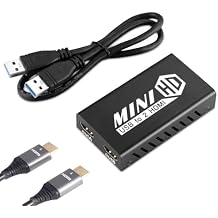
Unstincer USB 3.0 to Dual HDMI Adapter,Compatible with Windows ChromeBook MacBook,Support 3.5mm Jack Stereo Output Expand 2 Different Display Screens
Item #:
86837882
ETB 5222
Price Details
Excluding Shipping & Custom charges ( Shipping and custom charges will be calculated on checkout )
*All items will import from US
0 ratings
Write a review
In stock
 Imported from USA store
QTY:
Order now and get it around Friday, June 26
Secured transaction
Ubuy works hard to protect your security and privacy. Our advanced payment security system ensures confidentiality by encrypting your information during transmission using AES (Advanced Encryption Standards) and SSL (Secure Socket Layer) protocols. Your payment details are 100% secure as we do not share your payment details with third party sellers.
Our Top Logistics Partners


Expand your workspace with our Unstincer USB 3.0 to Dual HDMI Adapter and experience seamless multitasking across two independent displays.

Fast
Shipping

Free
Return*

Secure Packaging

100% Original Products

PCI DSS Compliance

ISO 27001 Certified


Note: Step Down Voltage Transformer required for using electronics products of US store (110-120). Recommended power converters Buy Now.


What Stands Out
Dual Display Support
Easily connect two HDMI displays simultaneously, enhancing productivity and multitasking capabilities without the hassle of traditional single-output adapters.
Broad Compatibility
Designed to work seamlessly with Windows, ChromeBook, and MacBook devices, making it a versatile choice for various users and ensuring wide accessibility.
High-Speed Connectivity
Utilizes USB 3.0 technology for rapid data transfer and minimal latency, ensuring smooth and efficient display performance during presentations or video playback.
Product Details
| Item Weight | 0.5 lbs (230 grams) |
Who Should Buy?

-
Office Workers
Ideal for multi-tasking, enabling two screens for better productivity and organization of work-related tasks.
-
Gamers
Perfect for gaming on multiple monitors, providing an immersive experience and improved gameplay strategies.
-
Students
Useful for presentations or studying, allowing access to multiple materials and multitasking efficiently.

-
Graphic Designers
May not provide the high-quality resolution and color accuracy needed for professional design work.
-
Older Devices
Not suitable for devices that lack USB 3.0 ports, limiting functionality and compatibility.
-
High-End Video Editing
Does not support 4K resolution at high performance, which is essential for serious video editing tasks.
Product Description
Unstincer USB 3.0 to Dual HDMI Adapter,Compatible with Windows ChromeBook MacBook,Support 3.5mm Jack Stereo Output Expand 2 Different Display Screens (Dual HDMI Adapter)
Have any Query? Chat with us
Customer Questions & Answers
-
Question:
What devices are compatible with the Unstincer USB 3.0 to Dual HDMI Adapter?
Answer: The Unstincer USB 3.0 to Dual HDMI Adapter is compatible with a variety of devices, including Windows PCs, Chromebooks, and MacBooks. This wide compatibility makes it ideal for users looking to extend their display setup without needing specialized hardware. Whether you're a gamer wanting to expand your screen real estate, a professional needing multiple monitors for enhanced productivity, or a student studying with more screen space, this adapter will serve your needs. -
Question:
Can I use the Unstincer adapter to connect two different displays?
Answer: Yes, you can use the Unstincer USB 3.0 to Dual HDMI Adapter to connect two different displays simultaneously. This feature allows you to mirror or extend your desktop across two screens, providing a more versatile workspace or an immersive gaming experience. For instance, you can use one screen for presentations while the other can display additional resources, making multitasking more efficient. -
Question:
Does the adapter support audio output through HDMI?
Answer: Absolutely! The Unstincer adapter supports audio output through HDMI along with video. This means you can enjoy high-definition sound along with the visual experience without needing separate audio cables. It’s perfect for streaming movies or playing games where audio clarity enhances the overall enjoyment, ensuring that you immerse yourself fully without the hassle of additional setups. -
Question:
What is the maximum resolution supported by this adapter?
Answer: The Unstincer USB 3.0 to Dual HDMI Adapter supports a maximum resolution of up to 1920x1080 per display. This resolution is suitable for most everyday applications such as working, gaming, presentations, and watching videos in high definition. Whether you’re engaged in graphic design or simply need better clarity for your everyday tasks, this capability helps ensure your visuals are sharp and clear. -
Question:
Is there a need for additional software when using the Unstincer adapter?
Answer: Typically, the Unstincer adapter does not require additional software installation on most operating systems, as it uses USB 3.0 technology that is natively supported. However, depending on your operating system, you may need to adjust display settings to optimize performance. This makes the setup straightforward for users looking for quick connections without the complexity of software installations. -
Question:
Can I use the 3.5mm jack for external speakers with this adapter?
Answer: Yes, the Unstincer USB 3.0 to Dual HDMI Adapter includes a 3.5mm jack that allows you to connect external speakers or headphones for enhanced audio performance. This feature is particularly useful for multimedia tasks, such as gaming or watching movies at home, where sound quality greatly affects the experience. You can easily switch from laptop audio to external sound systems for better output. -
Question:
How does the USB 3.0 interface benefit the performance of this adapter?
Answer: The USB 3.0 interface significantly improves data transfer rates compared to its predecessor, USB 2.0. This results in smoother video playback and better overall performance when using the adapter with multiple displays. For instance, if you’re handling high-resolution graphics or streaming from multiple sources, the faster data transfer reduces latency, ensuring a more seamless experience across your screens. -
Question:
Is the Unstincer USB to HDMI adapter portable?
Answer: Yes, the Unstincer USB 3.0 to Dual HDMI Adapter is designed to be highly portable. Its compact size makes it easy to slip into your laptop bag, making it an ideal companion for business travelers or students who often move between different locations. Whether you're setting up a temporary workstation at a cafe or presenting at a conference, its lightweight nature ensures you can extend your monitors on the go. -
Question:
What cable types are needed to use the Unstincer adapter?
Answer: To use the Unstincer USB 3.0 to Dual HDMI Adapter, you will need HDMI cables for each of your displays (sold separately). This allows you to connect monitors, TVs, or projectors easily. The flexibility of HDMI cables also means you can use cables of varying lengths based on your setup, whether at home or in a professional presentation environment. -
Question:
Where can I buy the Unstincer USB 3.0 to Dual HDMI Adapter?
Answer: You can buy the Unstincer USB 3.0 to Dual HDMI Adapter on Ubuy. They provide a reliable platform that caters to a variety of electronic accessories, ensuring you have access to sought-after products like this HDMI adapter. Ubuy also offers advanced search functionalities and customer support, aiding you in making informed purchasing decisions easily.
Unstincer DVI-HDMI Adapters Editorial Review
**** The product in focus has garnered a mix of reviews, highlighting both its strengths and weaknesses. Users generally praise the adapter for its functionality and ease of installation, enabling seamless connectivity for multiple monitors, particularly when used with M1 Mac Minis and MacBook Airs. Several customers noted how this adapter allowed them to efficiently extend displays without major hiccups, which is especially valuable in dynamic environments like churches or personal home offices. Despite its effectiveness, some users faced challenges. Issues reported included screen flickering, resolution adjustments that left iCons off-screen, and a few compatibility hiccups following major OS updates. While some frustrations stemmed from user error or initial installation misunderstandings, others pointed to recurring technical issues that detracted from the overall experience. Nonetheless, what truly stands out is the stellar customer service provided by the seller. Clients Consistently mentioned quick resolutions to problems, including the prompt replacement of defective products, which alleviated concerns despite the occasional technical failures. Overall, while the adapter exhibits a few quirks that could be improved, its affordability, combined with supportive customer service, makes it a worthwhile investment for those seeking an additional monitor solution. **
Customer Reviews & Ratings
1 customers ratings
-
5 Star
100%
-
4 Star
0%
-
3 Star
0%
-
2 Star
0%
-
1 Star
0%
Review this product
Share your thoughts with other customers
Pros
- Effective for connecting multiple monitors, enhancing productivity.
- Easy installation process, with clear initial setup instructions.
- Good performance with various devices, particularly Mac products.
- Affordable alternative to more expensive competing products.
Cons
- Limited functionality when used in clamshell mode with MacBook Air.
Product Price History
Important information
- Limitations : For products shipped internationally, please note that any manufacturer warranty may not be valid; manufacturer service options may not be available; product manuals, instructions, and safety warnings may not be in destination country languages; the products (and accompanying materials) may not be designed in accordance with destination country standards, specifications, and labeling requirements; and the products may not conform to destination country voltage and other electrical standards (requiring use of an adapter or converter if appropriate). The recipient is responsible for assuring that the product can be lawfully imported to the destination country. When ordering from Ubuy or its affiliates, the recipient is the importer of record and must comply with all laws and regulations of the destination country.
- Not all the products listed on Ubuy are for sale, as Ubuy is a global search engine. Products are subject to export/trade regulations.
ETB 5222
Order now and get it around Friday, June 26
This item is not restrict in my country.(Please click on above link if this item is not restrict in your country, So our team will review and allow.)
QTY:
Secured transaction
Ubuy works hard to protect your security and privacy. Our advanced payment security system ensures confidentiality by encrypting your information during transmission using AES (Advanced Encryption Standards) and SSL (Secure Socket Layer) protocols. Your payment details are 100% secure as we do not share your payment details with third party sellers.
Our Top Logistics Partners
Fastest cross-border delivery
Features & Benefits
- Transform your workspace with dual displays for enhanced productivity.
- Supports 1080P@60Hz resolution for clear and crisp images.
- Compatible with Windows, MacBook, and ChromeBook systems.
- Utilizes USB 3.0 for fast data transfer; backward compatible with USB 2.0.
- Easy plug-and-play installation—no additional power supply needed.
- Perfect for data comparison, securities monitoring, and multitasking.