- Home Page /
- Mobile Phone Accessories /
- Mobile Phone Accessories /
- Maintenance, Upkeep & Repairs /
- Replacement Parts /
- Screens /
- Screen Replacement LCD Display Touch Digitize...
0 ratings

Item #:
87391381
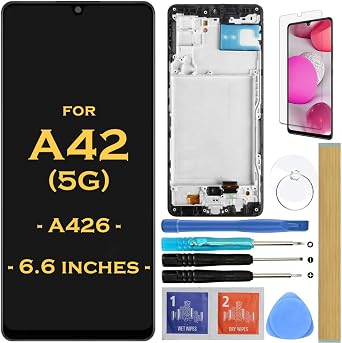
Screen Replacement LCD Display Touch Digitizer Assembly for Samsung Galaxy A42 5G 2020 SM-A426 A426B A426B/DS A426U A426V SM-A4260 6.6"
Item #:
87391381
ETB 4837
Price Details
Excluding Shipping & Custom charges ( Shipping and custom charges will be calculated on checkout )
*All items will import from US
0 ratings
Write a review
In stock
 Imported from USA store
QTY:
Order now and get it around Thursday, September 03
Secured transaction
Ubuy works hard to protect your security and privacy. Our advanced payment security system ensures confidentiality by encrypting your information during transmission using AES (Advanced Encryption Standards) and SSL (Secure Socket Layer) protocols. Your payment details are 100% secure as we do not share your payment details with third party sellers.
Our Top Logistics Partners


Compatible with Samsung Galaxy A42 5G 2020 SM-A426, includes LCD display, touch digitizer, and front glass panel pre-assembled.

Fast
Shipping

Free
Return*

Secure Packaging

100% Original Products

PCI DSS Compliance

ISO 27001 Certified



Note: Step Down Voltage Transformer required for using electronics products of US store (110-120). Recommended power converters Buy Now.


What Stands Out
High-Quality Display
Experience vibrant colors and sharp details with this premium LCD display, ensuring optimal visual performance for your Samsung Galaxy A42 5G.
All-in-One Assembly
Includes both touch digitizer and LCD in one easy-to-install package, reducing repair time and effort while enhancing device functionality.
Compatible Fit
Specifically designed for multiple Samsung Galaxy A42 5G models, guaranteeing a perfect fit and seamless integration for hassle-free replacements.
Product Details
| Compatible Devices | Cellphone |
| Item Hardness | 9H |
| Compatible Phone Models | SAMSUNG GALAXY A42 5G |
| Special Features | Scratch Resistant |
| Finish Type | Matte |
| Screen Size | 6.6 Inches (16.8 cm) |
| Screen Surface Description | Glossy |
| Clarity | 10 |
| Item Dimensions L x W | 6.47"L x 2.99"W (16.4 cm) |
| Number of Items | 1 |
| Material | Glass |
| Brand Name | HLTECH |
| Model Number | HL-A42-5G-Fr |
| Model Name | HL-A42-5G-Fr |
| Color | BLACK |
| Manufacturer | HLTECH |
| UPC | 762716012899 |
| Part Number | HL-A42-5G-Fr |
| Included Components | SCREEN PROTECTOR |
| Brand | HLTECH |
| Product Dimensions (L x W x H) | 6.47"L x 2.99"W (16.4 cm) |
| Special Feature | Scratch Resistant |
Who Should Buy?

-
DIY Repair Enthusiasts
Ideal for those who enjoy repairing their own devices and have basic technical skills for screen replacement.
-
Cost-Savvy Users
Perfect for budget-conscious individuals looking to save money versus paying for professional repair services.
-
Samsung Galaxy A42 Users
Specifically designed for Samsung Galaxy A42 5G owners needing screen replacement after damage or malfunction.

-
Non-Technical Users
Not suitable for individuals without repair experience, as installation requires technical knowledge and tools.
Product Description
Screen Replacement LCD Display Touch Digitizer Assembly for Samsung Galaxy A42 5G 2020 SM-A426 A426B A426B/DS A426U A426V SM-A4260 6.6"
Have any Query? Chat with us
Customer Questions & Answers
-
Question:
What is included in the Screen Replacement LCD Display Touch Digitizer Assembly for Samsung Galaxy A42 5G?
Answer: The assembly includes a high-quality LCD display, a touch digitizer, and necessary components for seamless integration. This ensures that users can restore their device's screen functionality to its original state. An included adhesive is often designed for easy application, making the installation process smoother. This is particularly beneficial for individuals who want to replace their cracked or malfunctioning screens without needing to buy multiple components or visit a professional repair service. -
Question:
How do I install the Screen Replacement LCD Display for Samsung Galaxy A42 5G?
Answer: Installation typically involves several steps: firstly, power off your device and remove the back cover. Next, disconnect the battery and carefully detach the broken screen from the device frame. Following that, align the new LCD display with the device's connectors and secure it in place. It's essential to follow a detailed guide or video for a step-by-step process. This approach ensures a successful installation, allowing users to enjoy a fully functional display once again. -
Question:
Is the Screen Replacement LCD Display for Samsung Galaxy A42 5G compatible with all model versions?
Answer: Yes, this replacement is specifically designed for various models of the Samsung Galaxy A42 5G, including SM-A426, A426B, A426BDS, A426U, A426V, and SM-A4260. This compatibility means you won't have to worry about discrepancies in size or connection issues. For the best results, double-check your model number before purchasing to ensure you get a perfect fit, allowing for a hassle-free repair experience. -
Question:
What should I do if I receive a defective Screen Replacement LCD Display?
Answer: If you encounter any defects with your screen replacement, it is advisable to contact the seller directly. Many reputable suppliers have customer service protocols for addressing such issues. Documenting any problems with photos can expedite the resolution process. If you are attempting a DIY repair, ensure that the issue is indeed a product fault and not related to installation errors to facilitate an effective resolution. -
Question:
Can I replace the screen myself or should I seek professional help?
Answer: While replacing the screen can be done by a DIY enthusiast with the right tools, those without experience may consider professional help to avoid potential damage. Assess your comfort level with technical tasks and the availability of resources. For instance, someone experienced with electronics might find it fulfilling to tackle the project themselves. In contrast, someone unfamiliar with such repairs may prefer the expertise of a professional technician. -
Question:
How does this replacement screen compare to the original Samsung display?
Answer: Many aftermarket replacements offer comparable display quality to original Samsung screens, ensuring vibrant colors and sharp visuals. However, quality can vary among brands, so choosing a reputable supplier is crucial. Read reviews and specifications to confirm you're getting a dependable product. Users seeking to maintain the best possible display performance should prioritize those replacements that boast high customer satisfaction rates. -
Question:
What tools do I need for the installation of the LCD display?
Answer: To proficiently install the replacement LCD display, you will generally need a small screwdriver set (particularly, a Phillips and Torx), a plastic opening tool, and tweezers. Additionally, having a heat gun or hairdryer can help loosen adhesives. These tools help minimize the risk of damage during the repair. For those new to such projects, considering a tool kit specifically designed for screen replacements can simplify the process significantly. -
Question:
Are there any risks associated with replacing the LCD display on my own?
Answer: Yes, the risks include damaging internal components, applying improper pressure during installation, or mismatching connectors. It's crucial to handle all components with care and follow instructions closely to mitigate these risks. Some users have had successful DIY experiences, while others found it challenging. Weigh your skill level and comfort with such tasks against the potential for mishaps before deciding on a DIY screen replacement. -
Question:
How do I test if the new LCD display is functioning properly post-installation?
Answer: Post-installation testing involves powering on the device to check for display responsiveness, brightness levels, and screen color fidelity. Testing touch sensitivity across the screen is also essential to ensure proper functionality. A thorough test can reveal any remaining issues, allowing for immediate troubleshooting or further action if the display does not operate correctly. It’s wise to conduct these tests before sealing the device back. -
Question:
Where can I buy the Screen Replacement LCD Display Touch Digitizer Assembly for Samsung Galaxy A42 5G?
Answer: You can purchase the Screen Replacement LCD Display Touch Digitizer Assembly for the Samsung Galaxy A42 5G from Ubuy. Ubuy offers a wide selection of electronic components and accessories, ensuring that you can find the right parts for your device repairs. By choosing Ubuy, you can benefit from their reliable service and range of product options tailored to meet your needs within Ethiopia.
HLTECH Screens HL-A42-5G-Fr Editorial Review
No editorial reviews found
Customer Reviews & Ratings
1 customers ratings
-
5 Star
100%
-
4 Star
0%
-
3 Star
0%
-
2 Star
0%
-
1 Star
0%
Review this product
Share your thoughts with other customers
Pros
- High display quality
- Easy installation
- Responsive touch
- Durable materials
- Affordable price
Platform Trust & Buyer Confidence

MA
Mohammad
Verified buyer
“Excellent quality and original too,when ubuy send original things I will appreciate that ,I very satisfied thank you”
23 July 2026 · via Trustpilot
CK
Chitra
Verified buyer
“The order and delivery progress was communicated very well. Package arrived within the estimated time. Products arrived as expected in good condition.”
22-Jul-26 · via Trustpilot
K
kund
Verified buyer
“Good supply of products. Safe payment methods, and shipment worldwide! Genuine products.”
23-Jul-26 · via Trustpilot
OO
Onesi
Verified buyer
“Was my first time buying a product from Ubuy, but I found it so helpful. This is reliable. Gonna place a new order!”
22 July 2026 · via Trustpilot
SJ
SAO JOHN
Verified buyer
“Ubuy is a great online platform to buy stuff. Reliable, fast delivery time and great value for money. I've been using Ubuy online shopping platform for three years now and will continue to do so.”
23 July 2026 · via Trustpilot
Secure Checkout
Global Delivery
Easy Returns
Genuine Products
Product Price History
Important information
- Limitations : For products shipped internationally, please note that any manufacturer warranty may not be valid; manufacturer service options may not be available; product manuals, instructions, and safety warnings may not be in destination country languages; the products (and accompanying materials) may not be designed in accordance with destination country standards, specifications, and labeling requirements; and the products may not conform to destination country voltage and other electrical standards (requiring use of an adapter or converter if appropriate). The recipient is responsible for assuring that the product can be lawfully imported to the destination country. When ordering from Ubuy or its affiliates, the recipient is the importer of record and must comply with all laws and regulations of the destination country.
- Not all the products listed on Ubuy are for sale, as Ubuy is a global search engine. Products are subject to export/trade regulations.
ETB 4837
Order now and get it around Thursday, September 03
This item is not restrict in my country.(Please click on above link if this item is not restrict in your country, So our team will review and allow.)
QTY:
Secured transaction
PCI DSS compliant and ISO 27001:2022 certified, with encrypted payments and full buyer protection on every order.
Our Top Logistics Partners
Fastest cross-border delivery
Features & Benefits
- Compatible with Samsung Galaxy A42 5G 2020 SM-A426
- Includes LCD display, touch digitizer, and front glass panel pre-assembled
- Comes with repair tools, adhesive, and screen protector
- Make sure to check flex cables and connectors before installation
- Power off phone and disconnect battery cable during assembly
- Ensure no debris or visible dust on the connector
Ubuy Assurance
Experience worry-free shopping with 100% original products, PCI DSS-compliant payment security, ISO 27001-certified data protection, the fastest cross-border delivery, free returns *, and secure packaging on every order.