- Home Page /
- Office Products /
- Office Electronics /
- Printers & Accessories /
- Computer Printers /
- Inkjet Computer Printers /
- Ink Tank Printers /
- Epson EcoTank ET-2850 Wireless Color All-in-O...
0 ratings





Item #:
71009420
Epson EcoTank ET-2850 Wireless Color All-in-One Cartridge-Free Supertank Printer with Scan, Copy and Auto 2-Sided Printing - Black, Medium
Item #:
71009420
ETB 81725
Price Details
Excluding Shipping & Custom charges ( Shipping and custom charges will be calculated on checkout )
*All items will import from US
In stock
 Imported from USA store
QTY:
Order now and get it around Sunday, June 28
Secured transaction
Ubuy works hard to protect your security and privacy. Our advanced payment security system ensures confidentiality by encrypting your information during transmission using AES (Advanced Encryption Standards) and SSL (Secure Socket Layer) protocols. Your payment details are 100% secure as we do not share your payment details with third party sellers.
Our Top Logistics Partners


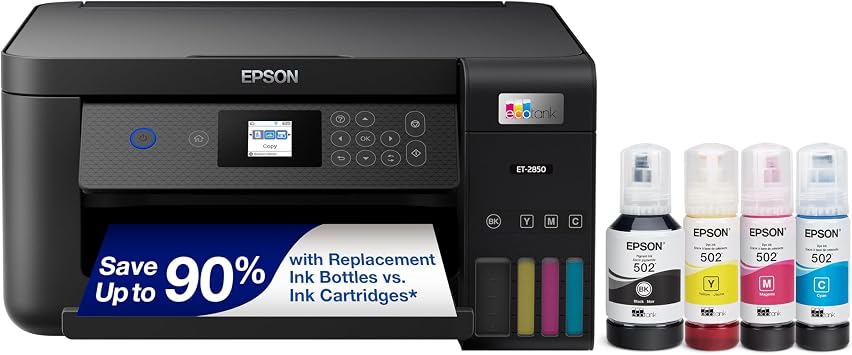
Save up to 90% with replacement ink bottles vs. ink cartridges

Fast
Shipping

Free
Return*

Secure Packaging

100% Original Products

PCI DSS Compliance

ISO 27001 Certified


Note: Step Down Voltage Transformer required for using electronics products of US store (110-120). Recommended power converters Buy Now.


What Stands Out
Cartridge-Free System
Eliminate the hassle of cartridge replacements with the EcoTank's innovative design, allowing you to print thousands of pages without needing to purchase new ink cartridges, ensuring convenience and cost savings.
Ultra-High Capacity
Featuring ultra-high capacity ink bottles, the EcoTank ET-2850 provides a lower cost per page, making it ideal for both home and small office environments seeking efficient printing without frequent ink changes.
Versatile Functionality
This all-in-one printer not only offers quality printing but also high-resolution scanning and copying capabilities, fulfilling multiple tasks efficiently, perfect for users needing a reliable multi-functional device.
Product Details
- EcoTank ET-2850 All-in-One Supertank Printer - Black
- Built-in wireless (802.11b/g/n) allows you to print from virtually anywhere.
- Prints up to 10.5 pages per minute in black and 5 pages per minute in color.
- Up to 4800 x 1200 dpi resolution for crisp images.
- Color printer copies up to 7.7 cpm in black and 3.8 cpm in color.
| Printer Type | Inkjet |
| Other Special Features of the Product | Auto 2-sided Printing, Mobile Printing Capability, Refillable Ink Tank |
| Printer Output Type | Color |
| Item Weight | 16.2 Pounds (7.35 kg) |
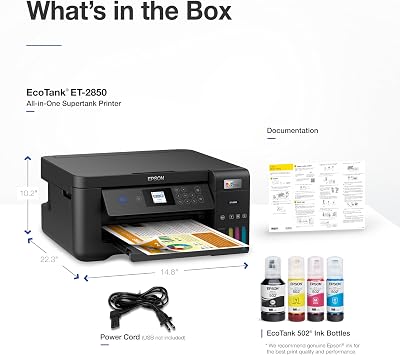
| Item Dimensions D x W x H | 22.3"D x 14.8"W x 10.2"H (56.6 x 37.6 x 25.9 cm) |
| Controller Type | Android |
| Print media | Envelopes, Glossy photo paper, Paper (plain) |
| Scanner Type | Flatbed |
| Maximum Copy Speed Black and White | 10.5 ppm |
| Compatible Devices | Smartphones |
| Maximum Copies Per Run | 100 |
| Ink Color | Black |
| Additional Printer Functions | All In One |
| Control Method | App |
| Number of Trays | 1 |
| Processor Count | 1 |
| Resolution | 5760 x 1440 |
| Display Type | LCD |
| Color | Black |
| Color Depth | 24 bpp |
| Maximum print Resolution Color | 5760 x 1440 |
| Maximum Print Resolution Black and White | 5760 x 1440 |
| Dual-sided printing | Yes |
| Duplex | auto |
| Brand | Epson |
| Model Name | EcoTank ET-2850-B |
| Model Number | ET-2850 Black |
| Built-In Media | EcoTank ET-2850 all-in-one, manual, power cord, 1 bottle of 502 Black (127 mL) and 1 bottle each of 502 Cyan, Magenta, Yellow (70 mL) (2) |
| Model Series | ET |
| Specific Uses For Product | Office, home office |
| UPC | 679541101554 808222455079 010343957817 |
| Manufacturer | Epson |
| Item Type Name | Inkjet Printer |
| Unit Count | 1.0 Count |
| Color Pages per Minute | 5 ppm |
| B&W Pages per Minute | 10.5 |
| Maximum Media Size | 8.5 x 14 inch (21.6 cm) |
| Maximum Sheet Capacity | 100 |
| Paper Size | 3.5" x 5", 4" x 6", 5" x 7", 8" x 10", 8.5" x 11", 8.5" x 14", A4, A6, half letter, legal, executive) Inches (8.9 x 137.2 x 165.1 cm) |
| Output sheet capacity | 150 |
| Printer Connectivity Type | USB, Wi-Fi |
| Hardware Interface | USB |
| Total Usb Ports | 1 |
| Maximum Copy Resolution Color | 5760 x 1440 dpi |
| Maximum Copy Resolution Black and White | 5760 x 1440 dpi |
| Connectivity Technology | USB, Wi-Fi |
| Printing Technology | Inkjet |
| Special Feature | Auto 2-sided Printing, Mobile Printing Capability, Refillable Ink Tank |
| Printer Output | Color |
| Maximum Print Speed (Color) | 5 ppm |
| Max Printspeed Monochrome | 10.5 |
What's in the box
EcoTank ET-2850 all-in-one, manual, power cord, 1 bottle of 502 Black (127 mL) and 1 bottle each of 502 Cyan, Magenta, Yellow (70 mL) (2)
Who Should Buy?

-
Frequent Print Users
Ideal for users who print regularly, as its high-capacity tanks minimize ink cartridge replacement and costs.
-
Home Office Setup
Perfect for home offices needing versatile functionality, including scanning, copying, and wireless printing capabilities.
-
Sustainability Advocates
Great for environmentally-conscious individuals who prefer cartridge-free solutions to reduce plastic waste.

-
Occasional Users
Not suitable for individuals who print infrequently, as ink might dry out in the high-capacity tanks.
-
Photo Quality Demands
May not meet professional-grade photo printing requirements; users seeking high-detail images should consider other options.
-
Mobile-Only Users
Less ideal for those who print exclusively from mobile devices, as desktop setup is often necessary.
Product Description
Have any Query? Chat with us
Customer Questions & Answers
-
Question:
What features does the Epson EcoTank ET-2850 offer?
Answer: The Epson EcoTank ET-2850 is equipped with several key features including wireless printing, scanning, copying, and automatic 2-sided printing. Its cartridge-free design utilizes large ink reservoirs that can be easily refilled, making it a cost-effective choice for users with high-volume printing needs. This model also supports mobile printing via Apple AirPrint and Google Cloud Print, allowing you to print directly from your smartphone or tablet, enhancing convenience for both home and office use. -
Question:
How does wireless printing work with the Epson ET-2850?
Answer: Wireless printing on the Epson ET-2850 is straightforward. The printer connects to your Wi-Fi network, allowing you to send print jobs from your computers, laptops, smartphones, or tablets without the need for wired connections. This flexibility enables you to print from virtually anywhere in your home or office, making it ideal for environments where multiple users share a printer. Simply ensure your device is connected to the same network and select the printer from your print menu. -
Question:
What is the cartridge-free system in the EcoTank ET-2850?
Answer: The cartridge-free system of the Epson EcoTank ET-2850 replaces traditional ink cartridges with large, refillable ink tanks. This not only reduces waste but also lowers your ink costs significantly over time. You can refill the ink tanks with bottles, and each refill can yield thousands of pages, making it perfect for users who print frequently. For instance, if you're running a small business or a home office with high printing demands, this system will help minimize interruptions due to low ink. -
Question:
Can the Epson ET-2850 scan and copy documents?
Answer: Yes, the Epson EcoTank ET-2850 is an all-in-one device that includes scanning and copying capabilities in addition to printing. You can easily digitize documents using the flatbed scanner, and make copies quickly with just a few clicks. This versatility is beneficial for users needing to handle various tasks, such as printing reports, scanning important documents for records, or making copies of presentations, all from a single machine. -
Question:
What types of paper can I use with the EcoTank ET-2850?
Answer: The Epson EcoTank ET-2850 supports various paper types, including plain paper, photo paper, and specialty media such as glossy or matte paper. It can handle different sizes as well, ranging from standard letter sizes to larger formats. This versatility enables you to produce professional-quality prints for a variety of needs, whether you're creating vibrant photos for a family album or preparing documents for a business meeting. -
Question:
Is the Epson ET-2850 suitable for home office use?
Answer: Absolutely! The Epson EcoTank ET-2850 is specifically designed to meet the needs of home office users with its all-in-one functionality and cartridge-free technology. Its compact design fits well in limited spaces, while the ability to print, copy, and scan from a single machine saves both time and space. Whether you're printing reports, scanning documents for digital storage, or making copies, this printer can enhance your productivity without constant interruptions for ink replacements. -
Question:
Are there any mobile printing options available with the Epson ET-2850?
Answer: Yes, the Epson EcoTank ET-2850 features mobile printing options such as Apple AirPrint, Google Cloud Print, and the Epson iPrint app. These features allow you to print directly from your mobile devices without needing to transfer files to a computer first. It’s especially useful for on-the-go professionals or students who need to print documents from their phones or tablets quickly and conveniently, ensuring you can get your work done wherever you are. -
Question:
How does the auto 2-sided printing feature work?
Answer: The auto 2-sided printing feature of the Epson EcoTank ET-2850 allows you to print on both sides of the paper automatically, saving you time and reducing paper usage. This feature is especially advantageous for printing lengthy documents, such as reports or presentations, as it streamlines the printing process. By enabling this option in your print settings, you can contribute to a more sustainable printing practice while maintaining a professional appearance in your materials. -
Question:
What are the typical uses for the Epson EcoTank ET-2850?
Answer: The Epson EcoTank ET-2850 is ideal for a variety of uses including home printing, business documentation, photo printing, and school assignments. Its high-capacity ink tanks reduce the need for frequent refills, making it particularly suitable for families, freelancers, or small businesses. From printing everyday documents to high-quality photos, this printer can adapt to diverse needs, ensuring you always get the best results whether at home or in a professional setting. -
Question:
Where can I buy the Epson EcoTank ET-2850 in Ethiopia?
Answer: You can purchase the Epson EcoTank ET-2850 from Ubuy in Ethiopia. Ubuy offers a wide selection of products including the EcoTank series, making it a convenient choice for your shopping needs. The platform provides detailed product descriptions and customer reviews to help you make informed decisions, ensuring that you get the right printer to meet your requirements.
Epson Ink Tank Printers ET-2850 Black Editorial Review


The Epson EcoTank ET-2850 is a wireless all-in-one printer that offers convenience and cost savings with its cartridge-free supertank system. It allows for easy scanning, copying, and auto 2-sided printing, making it a versatile choice for home or small office use. One common issue that some customers have faced is difficulty connecting the printer to their laptops. This seems to be resolved by ensuring that both the printer and the laptop are pointing to the same SSID. It's also worth noting that there may be a delay between sending a printing request and the printer actually starting to print. When it comes to printing on cardstock, the printer seems to work well with 110 lb cardstock for one-sided printing. However, a customer reported that 2-sided printing did not work on this type of paper. There have been complaints about the printer occasionally pulling on one side of the paper and causing it to print crooked. Additionally, one customer experienced a white plastic roller falling out and the printer jamming after just three hours of use, suggesting that it may be poorly made. While the printer can be connected with a USB cable, the cable itself is not provided with the printer. On the other hand, the printer can accommodate 9x12 inch paper, thanks to adjustable paper guides at the back. Unfortunately, the printer does not support full bleed (edge-to-edge) printing, but it prints well on cardstock. It's worth noting that some customers have reported issues with the printer printing with lines and occasional blotches of ink splattered on the page. In terms of overall customer reception, opinions are mixed. Some customers find the printer easy to install and use, with positive experiences filling the ink tanks. However, others express dissatisfaction with the printer's print quality, alignment issues, and poor overall reliability. Several customers have had connectivity problems with Wi-Fi and experienced random restarts and errors that were difficult to resolve. Despite some positive feedback about its ease of setup and connection to devices, the Epson EcoTank ET-2850 receives mixed reviews due to its inConsistent print quality, alignment issues, and reliability problems.
Customer Reviews & Ratings
8089 customers ratings
-
5 Star
68%
-
4 Star
12%
-
3 Star
5%
-
2 Star
3%
-
1 Star
12%
Review this product
Share your thoughts with other customers
Pros
- Cartridge-free supertank system for cost savings
- Easy to install and fill ink tanks
- Connects well to computers and smartphones
Cons
- InConsistent print quality with occasional lines and blotches
Product Price History
Important information
- Limitations : For products shipped internationally, please note that any manufacturer warranty may not be valid; manufacturer service options may not be available; product manuals, instructions, and safety warnings may not be in destination country languages; the products (and accompanying materials) may not be designed in accordance with destination country standards, specifications, and labeling requirements; and the products may not conform to destination country voltage and other electrical standards (requiring use of an adapter or converter if appropriate). The recipient is responsible for assuring that the product can be lawfully imported to the destination country. When ordering from Ubuy or its affiliates, the recipient is the importer of record and must comply with all laws and regulations of the destination country.
- Not all the products listed on Ubuy are for sale, as Ubuy is a global search engine. Products are subject to export/trade regulations.
ETB 81725
Order now and get it around Sunday, June 28
This item is not restrict in my country.(Please click on above link if this item is not restrict in your country, So our team will review and allow.)
QTY:
Secured transaction
Ubuy works hard to protect your security and privacy. Our advanced payment security system ensures confidentiality by encrypting your information during transmission using AES (Advanced Encryption Standards) and SSL (Secure Socket Layer) protocols. Your payment details are 100% secure as we do not share your payment details with third party sellers.
Our Top Logistics Partners
Fastest cross-border delivery
Features & Benefits
- High-capacity ink tanks mean no more tiny, expensive ink cartridges
- Up to 2 years of ink in the box
- Zero Cartridge Waste
- Impressive Print Quality
- Built-in Scanner & Copier, Plus Auto 2-sided Printing
- Features wireless, plus hands-free voice-activated printing