- Home Page /
- Electronics /
- Computer Accessories /
- Computer Accessories & Peripherals /
- Computer Hard Drive Accessories /
- Enclosures /
- QNINE NVME Enclosure, M.2 PCIe SSD M Key to U...
0 ratings

Item #:
12114978
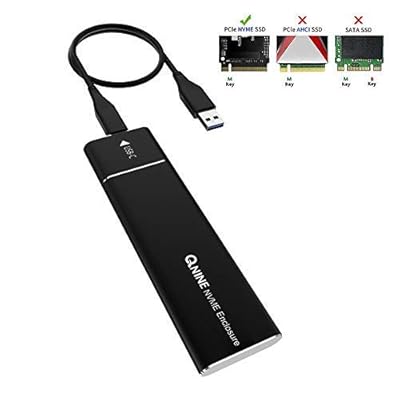
QNINE NVME Enclosure, M.2 PCIe SSD M Key to USB 3.0 External Case, Support Samsung 960 970 Evo ProWD Black NVME SSD and More
Item #:
12114978
ETB 5263
Price Details
Excluding Shipping & Custom charges ( Shipping and custom charges will be calculated on checkout )
*All items will import from US
0 ratings
Write a review
Out of stock
 Imported from USA store
Secured transaction
Ubuy works hard to protect your security and privacy. Our advanced payment security system ensures confidentiality by encrypting your information during transmission using AES (Advanced Encryption Standards) and SSL (Secure Socket Layer) protocols. Your payment details are 100% secure as we do not share your payment details with third party sellers.
Our Top Logistics Partners


With transfer speeds up to 10Gbps, access your data faster than ever before

Fast
Shipping

Free
Return*

Secure Packaging

100% Original Products

PCI DSS Compliance

ISO 27001 Certified


Note: Step Down Voltage Transformer required for using electronics products of US store (110-120). Recommended power converters Buy Now.


What Stands Out
High-Speed Connectivity
Equipped with USB 3.0, this NVME enclosure enables rapid data transfer rates, ensuring efficient file management and quick backups for professionals and enthusiasts alike.
Versatile Compatibility
Supports a variety of M.2 PCIe SSDs, including popular models like Samsung 960 and 970 Evo Pro, providing flexibility for users to utilize their existing drives.
Durable Design
Designed for robust everyday use, this enclosure features a solid construction that protects your SSD from physical damage while enhancing thermal performance during operation.
Product Details
| Item Weight | 0.5 lbs (230 grams) |
Who Should Buy?

-
Content Creators
Ideal for video editors and photographers needing fast external storage for large files and quick access.
-
Gamers
Perfect for gamers who want to increase their console or PC storage speed without compromising performance.
-
Tech Enthusiasts
Great for tech-savvy users who want to upgrade their storage solutions and utilize NVMe SSD's high speeds.

-
Basic Users
Not suitable for casual users looking for simple external storage options without needing high speed.
-
Old Devices
Users with older computers or devices that do not support USB 3.0 may face compatibility issues.
-
Budget Shoppers
Those on a tight budget might find more affordable options without the need for high-performance drives.
Product Description
QNINE NVME Enclosure, M.2 PCIe SSD M Key to USB 3.0 External Case, Support Samsung 960 970 Evo ProWD Black NVME SSD and More
Have any Query? Chat with us
Customer Questions & Answers
-
Question:
What is an NVME enclosure?
Answer: An NVME enclosure is an external case designed to house NVME M.2 PCIe SSDs, allowing them to connect to devices via USB. This setup enables high-speed data transfer, making it suitable for tasks requiring fast read/write speeds, like video editing or gaming. Such enclosures are crucial for users looking to expand their storage without internal installation, easily turning an NVME SSD into portable storage that can be used across multiple devices. -
Question:
Which NVME SSDs are compatible with this enclosure?
Answer: The NVME enclosure supports a range of M.2 PCIe SSDs, including the Samsung 960, 970 Evo, Pro, and WD Black NVME SSDs. This wide compatibility makes it a great choice for users with different SSD brands and models. When choosing an SSD, ensure it's M-Key and follows the 2280 format to fit perfectly within the enclosure, allowing you to take advantage of the high performance these drives offer. -
Question:
What is the importance of using a USB 3.0 connection?
Answer: Using a USB 3.0 connection with an NVME enclosure ensures significantly faster data transfer speeds compared to previous USB versions. USB 3.0 can provide speeds up to 5 Gbps, enabling quick data transfer of large files, which is essential for professionals dealing with high-resolution videos or extensive datasets. This speed enhances your workflow, allowing you to spend less time waiting for data transfers and more time on productive tasks. -
Question:
How can I install an NVME SSD in the enclosure?
Answer: To install an NVME SSD in the enclosure, follow these simple steps: First, open the enclosure using the screws provided. Next, slide the NVME SSD into the M-Key slot at an angle and press it down flat before securing it with screws. Reassemble the enclosure and connect it to your device via USB. This straightforward installation process requires no additional tools and is perfect for those looking to upgrade their storage without technical expertise. -
Question:
Is it possible to use the enclosure with a game console?
Answer: Yes, you can use the NVME enclosure with gaming consoles that support external drives. This feature allows gamers to expand their storage for games and downloads, benefiting from the high speeds of NVME SSDs for quicker load times and smooth gameplay. Ensure your console recognizes the external drive by following its setup procedures, enhancing your gaming experience with faster access to games and updates. -
Question:
Can I use this enclosure for backups?
Answer: Absolutely! The NVME enclosure is an excellent choice for creating backups, thanks to the speed and reliability of NVME SSDs. You can store important files, documents, or entire system images securely. Using software for backup management, you can set schedules for automatic backups, ensuring your data is consistently protected while enjoying the high-speed retrieval that NVME drives provide. -
Question:
What makes NVME SSDs better than SATA SSDs?
Answer: NVME SSDs outperform SATA SSDs significantly in terms of speed and efficiency. While SATA offers up to 600 MB/s, NVME can reach speeds exceeding 3000 MB/s, making them ideal for high-demand applications. This performance boost is beneficial for tasks such as video editing, heavy multitasking, and gaming, where every millisecond counts in loading times and data access. -
Question:
Is data encryption supported with this enclosure?
Answer: Many NVME enclosures, including this one, support data encryption features, offering enhanced security for sensitive files. This feature is especially important for users dealing with confidential information, as it prevents unauthorized access. Always check the specifications and features to ensure the encryption capabilities meet your security needs, providing peace of mind when working with private data. -
Question:
What is the maximum storage capacity supported?
Answer: The NVME enclosure typically supports a wide range of capacities, with many allowing SSDs up to 2TB or more. This flexibility ensures users can select storage that meets their needs, whether for personal data, gaming, or professional use. Selecting an SSD with adequate capacity ensures you have enough space for your files and applications, keeping your digital life organized without running out of space. -
Question:
Where can I buy the NVME Enclosure?
Answer: You can conveniently purchase the NVME Enclosure, M.2 PCIe SSD M Key to USB 3.0 External Case from Ubuy in Ethiopia. Ubuy offers a user-friendly shopping experience with access to various electronics, including high-quality NVME enclosures. By choosing Ubuy, you can ensure you're getting a reliable product with excellent service, making your shopping journey smooth and satisfying.
QNINE Enclosures Editorial Review
The QNINE NVME USB Enclosure features a JMS583 10 Gbps USB 3.1 Gen 2 to PCIe Gen 3 x2 Bridge Chip and is compatible with Samsung 960 970 EVO PRO WD Black NVME SSD. It can be used for cloning M.2 to M.2, M.2 to SSD and pulling data from laptop disk drives. However, some users have reported that a drive should not be left in the enclosure long-term as it does not allow for the drive to drop to lower P-state and can run incredibly hot. Additionally, the adapter has a bandwidth limit of 600MB/s and practical speeds can be lower, especially for small files.
Customer Reviews & Ratings
1 customers ratings
-
5 Star
100%
-
4 Star
0%
-
3 Star
0%
-
2 Star
0%
-
1 Star
0%
Review this product
Share your thoughts with other customers
Pros
- Compatible with various NVME SSDs.
- Useful for backing up and cloning data.
- Can be used for data transfer from laptop disk drives.
Cons
- May not keep SSD drives cool.
Product Price History
Important information
- Limitations : For products shipped internationally, please note that any manufacturer warranty may not be valid; manufacturer service options may not be available; product manuals, instructions, and safety warnings may not be in destination country languages; the products (and accompanying materials) may not be designed in accordance with destination country standards, specifications, and labeling requirements; and the products may not conform to destination country voltage and other electrical standards (requiring use of an adapter or converter if appropriate). The recipient is responsible for assuring that the product can be lawfully imported to the destination country. When ordering from Ubuy or its affiliates, the recipient is the importer of record and must comply with all laws and regulations of the destination country.
- Not all the products listed on Ubuy are for sale, as Ubuy is a global search engine. Products are subject to export/trade regulations.
ETB 5263
Currently unavailable.
We don't know when or if this item will be back in stock.
This item is not restrict in my country.(Please click on above link if this item is not restrict in your country, So our team will review and allow.)
Secured transaction
Ubuy works hard to protect your security and privacy. Our advanced payment security system ensures confidentiality by encrypting your information during transmission using AES (Advanced Encryption Standards) and SSL (Secure Socket Layer) protocols. Your payment details are 100% secure as we do not share your payment details with third party sellers.
Our Top Logistics Partners
Fastest cross-border delivery
Features & Benefits
- USB 3.1 Gen 2 (10 Gbps) High-Speed transfer Type-C port
- Aluminum material with four-sided curved design
- Compact and portable NVME enclosure
- Super-fast read & write up to 900+ Mb/s
- Backward compatible with USB 3.0 and USB 2.0
- Hot-plug, Plug and play, no driver required