- Home Page /
- Electronics /
- Computer Accessories /
- Computer Components /
- Laptop Replacement Parts /
- Laptop Replacement US Layout Keyboard for Len...
0 ratings

Item #:
48608524
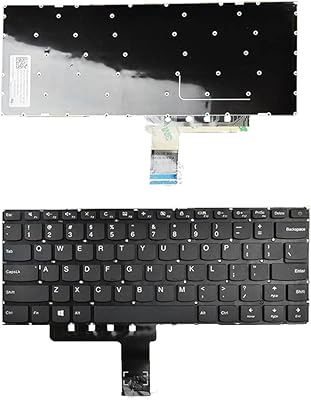
Laptop Replacement US Layout Keyboard for Lenovo Ideapad 310-14IKB 310-14ISK 310-14IAP 110-14IBR No Frame
Item #:
48608524
ETB 1325462
Price Details
Excluding Shipping & Custom charges ( Shipping and custom charges will be calculated on checkout )
*All items will import from US
0 ratings
Write a review
Out of stock
 Imported from USA store
Secured transaction
Ubuy works hard to protect your security and privacy. Our advanced payment security system ensures confidentiality by encrypting your information during transmission using AES (Advanced Encryption Standards) and SSL (Secure Socket Layer) protocols. Your payment details are 100% secure as we do not share your payment details with third party sellers.
Our Top Logistics Partners


Fast
Shipping

Free
Return*

Secure Packaging

100% Original Products

PCI DSS Compliance

ISO 27001 Certified


Note: Step Down Voltage Transformer required for using electronics products of US store (110-120). Recommended power converters Buy Now.


What Stands Out
Exact Fit
Designed specifically for Lenovo Ideapad 310 models, ensuring perfect compatibility and easy installation for hassle-free replacement without the need for additional modifications.
US Layout
Features a standard US keyboard layout, making it user-friendly for American customers and ideal for seamless typing without confusion over key placements.
Durable Design
Crafted with high-quality materials to provide exceptional durability and longevity, ensuring the keyboard remains functional and visually appealing during extensive use.
Product Details
| Item Weight | 0.7 lbs (320 grams) |
Who Should Buy?

-
Frequent Travelers
Ideal for users who need a lightweight, portable keyboard for their Lenovo Ideapad while on the go.
-
Budget-Conscious Users
A great alternative for those looking to replace a broken keyboard without spending a lot on repairs.
-
DIY Enthusiasts
Perfect for tech-savvy individuals comfortable with DIY repairs and seeking to replace their laptop keyboard.

-
Professional Gamers
May lack advanced features and durability that serious gamers require from their gaming keyboards.
-
Non-Technical Users
Not suitable for users who are uncomfortable with hardware replacements or lack technical skills for installation.
-
Custom Layout Seekers
Not recommended for users requiring custom layouts or specific key functions that this keyboard does not support.
Product Description
Laptop Replacement US Layout Keyboard for Lenovo Ideapad 310-14IKB 310-14ISK 310-14IAP 110-14IBR No Frame
Have any Query? Chat with us
Customer Questions & Answers
-
Question:
What are the compatible models for the Lenovo Ideapad 310 keyboard?
Answer: The Lenovo Ideapad 310 replacement keyboard is specifically designed for models 310-14IKB, 310-14ISK, 310-14IAP, and 110-14IBR. This ensures that the keyboard fits perfectly and maintains the original functionality. When replacing the keyboard, it’s essential to verify that your model number matches these specifications, as using an incompatible keyboard can affect performance and usability. The correct model pairing provides a seamless installation and optimal typing experience. -
Question:
How do I install the Lenovo Ideapad 310 replacement keyboard?
Answer: Installing the Lenovo Ideapad 310 replacement keyboard involves a few straightforward steps. Start by turning off your laptop and disconnecting it from the power source. Carefully remove the old keyboard by unscrewing the necessary screws and detaching it from the motherboard. Place the new keyboard into position, securing it with screws and ensuring it aligns correctly. Finally, reconnect the power and test the keyboard functionality. This process can enhance your typing experience significantly when you have a faulty keyboard. -
Question:
Is the Lenovo Ideapad 310 keyboard backlit?
Answer: The replacement keyboard for the Lenovo Ideapad 310 models does not come with a backlit feature, as many of these models were not designed with backlighting capabilities. Users looking for a keyboard with backlighting may need to consider alternate options or different models. Understanding your typing environment, especially in low-light conditions, can influence your choice, making this an important aspect to consider. -
Question:
What is the layout type of the Lenovo Ideapad 310 keyboard?
Answer: The Lenovo Ideapad 310 replacement keyboard features a US layout which stands out due to its distinct arrangement of keys. This layout is favored by many users for its familiarity and ease of use, particularly in the English-speaking regions. It's crucial for users to ensure they require this specific layout for a pleasant and efficient typing experience. -
Question:
Can I customize keycaps for the Lenovo Ideapad 310 keyboard?
Answer: While it is possible to customize keycaps on the Lenovo Ideapad 310 keyboard, it's essential to note the specific dimensions and key shapes of this model. Custom keycaps can enhance aesthetic appeal or provide different tactile feedback, but compatibility is key. Ensure that the new keycaps fit properly to avoid any typing difficulties, which can enhance both functionality and personal expression. -
Question:
What are the benefits of replacing my keyboard?
Answer: Replacing a faulty or damaged keyboard can significantly enhance your laptop's functionality. Users may experience improved typing responsiveness, elimination of sticking keys, and a cleaner appearance, which contributes to a better overall user experience. This can be especially beneficial for professionals who rely heavily on their laptops for work, gaming enthusiasts, or students who frequently type. -
Question:
Are there any specific care tips for the Lenovo Ideapad 310 keyboard?
Answer: Maintaining your Lenovo Ideapad 310 keyboard is essential for optimal functionality. Regularly cleaning the keyboard with a soft brush or cloth to remove dust and debris can prevent damage. Additionally, avoiding eating and drinking near the laptop can help keep the keyboard in good condition. Simple maintenance practices ensure that your keyboard remains functional and visually appealing over time. -
Question:
What tools do I need for the keyboard replacement process?
Answer: For replacing the Lenovo Ideapad 310 keyboard, you'll typically need a Phillips-head screwdriver, a plastic spudger or prying tool, and an anti-static wrist strap if available. These tools help you accomplish the installation smoothly without damaging any components. Ensuring you have the right tools not only simplifies the process but also helps ensure a professional-looking result. -
Question:
Can I use a non-original keyboard for my Lenovo Ideapad 310?
Answer: Using a non-original keyboard is an option, but it's crucial to choose a high-quality alternative that matches the specifications of the Lenovo Ideapad 310. Inferior keyboards may lead to performance issues or installation difficulties. Opting for compatible or branded alternatives can provide a similar typing experience, although original products are typically recommended for the best fit and functionality. -
Question:
Where can I buy Laptop Replacement US Layout Keyboard for Lenovo Ideapad 310 in Ethiopia?
Answer: You can buy the Laptop Replacement US Layout Keyboard for Lenovo Ideapad 310 models at Ubuy. This platform offers a variety of electronic components and accessories, ensuring that you can find the specific model you need for your laptop. With detailed product descriptions and user reviews available, Ubuy provides a trustworthy option for your purchasing needs, ensuring a smooth buying experience.
LXDDP Laptop Replacement Parts Editorial Review
No editorial reviews found
Customer Reviews & Ratings
1 customers ratings
-
5 Star
100%
-
4 Star
0%
-
3 Star
0%
-
2 Star
0%
-
1 Star
0%
Review this product
Share your thoughts with other customers
Pros
- Easy to install
- Comfortable to type on
- Responsive keys
- High-quality build
- Perfect fit for Lenovo models
Cons
- May take time to adjust to layout.
Product Price History
Important information
- Limitations : For products shipped internationally, please note that any manufacturer warranty may not be valid; manufacturer service options may not be available; product manuals, instructions, and safety warnings may not be in destination country languages; the products (and accompanying materials) may not be designed in accordance with destination country standards, specifications, and labeling requirements; and the products may not conform to destination country voltage and other electrical standards (requiring use of an adapter or converter if appropriate). The recipient is responsible for assuring that the product can be lawfully imported to the destination country. When ordering from Ubuy or its affiliates, the recipient is the importer of record and must comply with all laws and regulations of the destination country.
- Not all the products listed on Ubuy are for sale, as Ubuy is a global search engine. Products are subject to export/trade regulations.
ETB 1325462
Currently unavailable.
We don't know when or if this item will be back in stock.
This item is not restrict in my country.(Please click on above link if this item is not restrict in your country, So our team will review and allow.)
Secured transaction
Ubuy works hard to protect your security and privacy. Our advanced payment security system ensures confidentiality by encrypting your information during transmission using AES (Advanced Encryption Standards) and SSL (Secure Socket Layer) protocols. Your payment details are 100% secure as we do not share your payment details with third party sellers.
Our Top Logistics Partners
Fastest cross-border delivery