- Home Page /
- Electronics /
- Computer Accessories /
- Networking Products /
- Hubs /
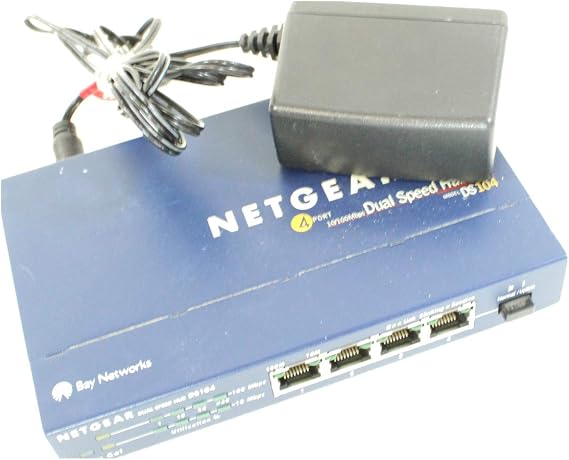
- Netgear DS104 4-Port 10/100 Dual Speed Hub wi...
0 ratings


Item #:
125758661
Netgear DS104 4-Port 10/100 Dual Speed Hub with Uplink Button
75% of respondents would recommend this to a friend
Item #:
125758661
ETB 22869
Price Details
Excluding Shipping & Custom charges ( Shipping and custom charges will be calculated on checkout )
*All items will import from US
0 ratings
Write a review
In stock
 Imported from USA store
QTY:
Order now and get it around Saturday, October 03
Secured transaction
Ubuy works hard to protect your security and privacy. Our advanced payment security system ensures confidentiality by encrypting your information during transmission using AES (Advanced Encryption Standards) and SSL (Secure Socket Layer) protocols. Your payment details are 100% secure as we do not share your payment details with third party sellers.
Our Top Logistics Partners


Connect multiple PCs to share printers, files, and Internet access effortlessly with the Netgear DS-104 Hub.

Fast
Shipping

Free
Return*

Secure Packaging

100% Original Products

PCI DSS Compliance

ISO 27001 Certified



Note: Step Down Voltage Transformer required for using electronics products of US store (110-120). Recommended power converters Buy Now.


What Stands Out
Dual Speed Ports
The Netgear DS104 offers both 10 and 100 Mbps port speeds, ensuring compatibility with various devices and providing flexibility for different networking needs.
Uplink Button
Equipped with an uplink button, this hub simplifies expansion by allowing easy connection to additional networking devices, making setup straightforward for both home and office use.
Compact Design
The compact form factor of the DS104 allows for easy placement in any environment, optimizing your workspace without sacrificing performance or functionality.
Product Details
| Hardware Interface | Ethernet, USB 3.0 |
| Additional Features | Play, Plug |
| Compatible Devices | Routers |
| Total Usb Ports | 4 |
| Data Transfer Rate | 100 megabits_per_second |
| Number of Ports | 4 |
| Operating System | Linux, Windows, macOS |
| Color | Blue |
| Enclosure Material | Metal |
| Item Weight | 13.92 ounces (394.63 grams) |
| Brand | NETGEAR |
| Manufacturer | Netgear |
| UPC | 606449002706 |
| Global Trade Identification Number | 00606449002706 |
| Unit Count | 1 Count |
| Item Part Number | DS104NA |
| Model Number | DS-104 |
| Mfr Part Number | DS-104 |
| Special Feature | Play, Plug |
Who Should Buy?

-
Small Office Setup
Ideal for small businesses requiring basic network connectivity to connect a few devices easily.
-
Home Networking
Perfect for home users looking to connect multiple devices without complex network configurations.
-
Budget-Conscious Buyers
Great option for users looking for an economical solution for basic networking needs without high costs.

-
High Bandwidth Needs
Not suitable for users needing high-speed connections for activities like gaming or 4K streaming.
Product Description
Netgear DS104 4-Port 10/100 Dual Speed Hub with Uplink Button
Have any Query? Chat with us
Customer Questions & Answers
-
Question:
What is the purpose of the Netgear DS104 4-Port Hub?
Answer: The Netgear DS104 4-Port Hub is designed to connect multiple devices in a local area network (LAN). It allows for seamless communication between various computers, printers, and other network devices. This hub operates at 10/100 Mbps, enabling dual-speed functionality which optimizes network performance for both older and newer devices. For example, if you have several computers that need to share resources or access the internet through a single connection, the DS104 makes that possible by expanding the number of available ports. -
Question:
How does the uplink button on the DS104 work?
Answer: The uplink button on the Netgear DS104 simplifies network expansion by allowing you to connect this hub to another switch or router. When the uplink button is activated, it automatically switches the appropriate port to facilitate a direct connection with other network devices. This feature is especially beneficial when setting up a larger network environment, like in a small office or home office, where multiple connections are required to enhance productivity and connectivity. -
Question:
Is the Netgear DS104 compatible with all devices?
Answer: Yes, the Netgear DS104 is designed to be compatible with a wide range of devices thanks to its adherence to the IEEE standards for Ethernet. This includes compatibility with computers, printers, and even gaming consoles. Whether you are setting up a basic home network or integrating various equipment in an office, you can expect the DS104 to effectively support multiple brands and device types, ensuring a smooth and versatile networking experience. -
Question:
What networking protocols does the DS104 support?
Answer: The Netgear DS104 Hub supports standard Ethernet protocols including 10BASE-T and 100BASE-T, enabling it to function at both 10 Mbps and 100 Mbps speeds. This dual-speed capability allows for flexibility in setting up your network according to the specific needs of your devices. For instance, older devices may operate better on a 10 Mbps setting, while modern devices can take full advantage of 100 Mbps for faster data transfer speeds, making the hub a versatile option for mixed-network environments. -
Question:
Can the Netgear DS104 be used for gaming?
Answer: Absolutely! The Netgear DS104 can be an excellent addition to your gaming setup. By connecting multiple gaming consoles or PCs to the hub, you can create a stable and robust local network that minimizes lag and enhances gameplay. This is particularly useful for multiplayer gaming, where fast connections between devices are essential for an optimal experience. Moreover, the hub's dual-speed feature ensures that it meets the connectivity demands of both casual and hardcore gamers. -
Question:
How is the power consumed by the Netgear DS104?
Answer: The Netgear DS104 operates efficiently with a low power consumption profile, making it an eco-friendly choice for networking needs. This hub is designed to minimize energy use compared to older models, without compromising performance. By utilizing this hub in your network setup, you not only help reduce your energy bill but also contribute to a more sustainable home or office environment, supporting energy saving practices in daily operations. -
Question:
What types of cables are compatible with the Netgear DS104?
Answer: The Netgear DS104 is compatible with standard Ethernet cables, specifically Category 5 (Cat 5) and Category 5e (Cat 5e) cables. These cables are widely used for network connections, ensuring you can easily find suitable options to connect your devices. Whether you are running short distances between devices or longer runs to different rooms, the use of these cable types will ensure you achieve optimal performance and reliability within your network. -
Question:
Does the DS104 have LED indicators?
Answer: Yes, the Netgear DS104 is equipped with LED indicators for each port and for power status. These indicators provide real-time feedback on connection status and activity, allowing users to quickly identify whether devices are properly connected and functioning. This feature is particularly useful in troubleshooting scenarios, as users can easily see if a device is not receiving power or if a network connection is dropped. -
Question:
Is the Netgear DS104 difficult to install?
Answer: No, the installation of the Netgear DS104 is straightforward. Simply plug the hub into a power outlet, connect your devices using Ethernet cables, and you're ready to go. It requires minimal technical expertise, making it suitable for users of all skill levels. Whether you’re setting up a home network or adding to an existing one, the plug-and-play capability allows for quick and hassle-free setup, enabling users to enjoy immediate connectivity. -
Question:
Where can I buy the Netgear DS104 4-Port Hub in Ethiopia?
Answer: You can purchase the Netgear DS104 4-Port Hub on Ubuy. Ubuy is a reliable platform that offers a variety of electronics, including networking devices like the DS104. It provides a convenient shopping experience, ensuring you can find the product with desired specifications and features easily.
NETGEAR Hubs DS-104 Editorial Review
The Netgear DS104 4-Port 10/100 Dual Speed Hub has received a mixed reception from users. While some customers reported satisfactory performance for basic networking tasks, many highlighted the limitations of using a hub compared to a switch. The primary function of the hub is to connect devices, allowing them to see all transmitted packets. This can be beneficial for specific testing purposes or network analysis. However, several reviews indicate that the efficiency in delivering data, particularly for tasks like printing or heavy data usage, is subpar when used in comparison to more modern switches. The prevailing sentiment suggests that while the DS104 operates as intended, emerging challengers like switches greatly outperform it, making a hub seem less relevant in current networking setups. Users reported that they experienced noticeable slowdowns and inefficiencies, prompting some to finally opt for switches instead, citing significant improvements in their network performance. Despite its basic operational capabilities, many reviewers recommend transitioning from hubs to switches for better functionality and speed, thus positioning the DS104 more as a transitional device than a leading solution in networking. **
Customer Reviews & Ratings
1 customers ratings
-
5 Star
100%
-
4 Star
0%
-
3 Star
0%
-
2 Star
0%
-
1 Star
0%
Review this product
Share your thoughts with other customers
Pros
- Functions as intended for basic network connectivity.
- Allows for packet analysis and monitoring.
- Satisfactory performance for light usage or specific testing requirements.
Cons
- Less efficient than modern switches; limited performance for heavy data tasks.
Platform Trust & Buyer Confidence

JK
Jasmin
Verified buyer
“Great products and very good service: very easy and very fast international delivery.”
9 September 2026 · via Trustpilot
AG
Anke
Verified buyer
“Wonderful online shopping experience, smooth transaction from the start. Payment method works conveniently and delivery is unexpectedly fast and reliable. You go the extra mile for service. What makes this even more amazing, you deliver to Namibia. I will remain a happy Ubuy customer and will increase my purchases for sure! Thank you!”
10 September 2026 · via Trustpilot
H
Hazel
Verified buyer
“Very easy to find the products what you need, and so fast delivery, that’s why I highly recommended to others costumers to used ubuy.”
10 September 2026 · via Trustpilot
O
Opaleye
Verified buyer
“I received exactly what I ordered I was skeptical about your site because that was my first time to order. But the order came timely and neatly packaged. I was not disappointed. Thank you.”
11 September 2026 · via Trustpilot
AC
Adele
Verified buyer
“Easy to find and order what you want on the website. Delivery is quick to the UK”
8 September 2026 · via Trustpilot
Secure Checkout
Global Delivery
Easy Returns
Genuine Products
Product Price History
Important information
- Limitations : For products shipped internationally, please note that any manufacturer warranty may not be valid; manufacturer service options may not be available; product manuals, instructions, and safety warnings may not be in destination country languages; the products (and accompanying materials) may not be designed in accordance with destination country standards, specifications, and labeling requirements; and the products may not conform to destination country voltage and other electrical standards (requiring use of an adapter or converter if appropriate). The recipient is responsible for assuring that the product can be lawfully imported to the destination country. When ordering from Ubuy or its affiliates, the recipient is the importer of record and must comply with all laws and regulations of the destination country.
- Not all the products listed on Ubuy are for sale, as Ubuy is a global search engine. Products are subject to export/trade regulations.
ETB 22869
Order now and get it around Saturday, October 03
This item is not restrict in my country.(Please click on above link if this item is not restrict in your country, So our team will review and allow.)
QTY:
Secured transaction
PCI DSS compliant and ISO 27001:2022 certified, with encrypted payments and full buyer protection on every order.
Our Top Logistics Partners
Fastest cross-border delivery
Features & Benefits
- Easily connect multiple PCs for seamless sharing of printers and files.
- Supports both 10 Mbps and 100 Mbps devices without any configuration.
- Built-in self-learning bridge for efficient traffic management.
- Auto-sensing dual-speed ports ensure optimal performance.
- Compact design fits well in any small-business environment.
- Easy installation with 'Plug and Play' feature.
Ubuy Assurance
Experience worry-free shopping with 100% original products, PCI DSS-compliant payment security, ISO 27001-certified data protection, the fastest cross-border delivery, free returns *, and secure packaging on every order.