0 ratings




Item #:
97667209
TESmart 4K@144Hz Displayport + HDMI KVM Switch 3 Monitors 2 Computers USB 3.0, HDMI 2.1&DP 1.4 KVM Switch Triple Monitors 8K@60Hz Gaming, Support
Item #:
97667209
ETB 124155
Price Details
Excluding Shipping & Custom charges ( Shipping and custom charges will be calculated on checkout )
*All items will import from US
In stock
 Imported from USA store
QTY:
Only 12 items left in stock.
Order now and get it around Thursday, July 02
Secured transaction
Ubuy works hard to protect your security and privacy. Our advanced payment security system ensures confidentiality by encrypting your information during transmission using AES (Advanced Encryption Standards) and SSL (Secure Socket Layer) protocols. Your payment details are 100% secure as we do not share your payment details with third party sellers.
Our Top Logistics Partners


Experience tear-free, ghost-free visuals with precise 8K/4K editing and gaming, thanks to our ideal KVM switch for gaming enthusiasts!

Fast
Shipping

Free
Return*

Secure Packaging

100% Original Products

PCI DSS Compliance

ISO 27001 Certified


Note: Step Down Voltage Transformer required for using electronics products of US store (110-120). Recommended power converters Buy Now.


What Stands Out
Multi-Display Support
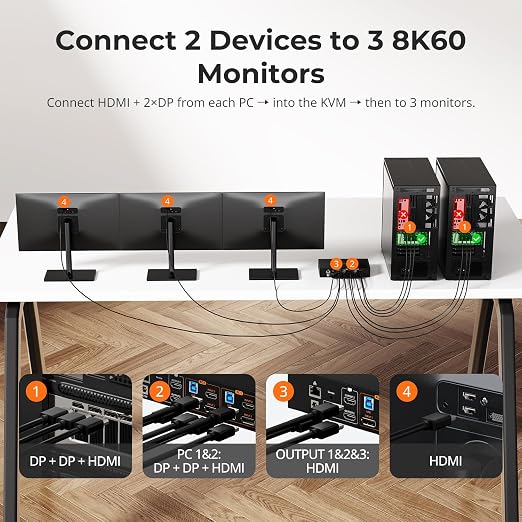
Seamlessly connects and manages three monitors from two computers with 4K@144Hz output, enhancing your multitasking capabilities for gamers and professionals alike.
Advanced Connectivity
Equipped with HDMI 2.1 and DP 1.4, ensuring compatibility with high-resolution displays, fast refresh rates, and supporting modern gaming technologies like VRR for an unmatched gaming experience.
Complete Setup
Includes all necessary cables and USB 3.0 connections, offering a convenient plug-and-play solution that saves time and reduces setup complexity for users looking to streamline their workspace.
Product Details
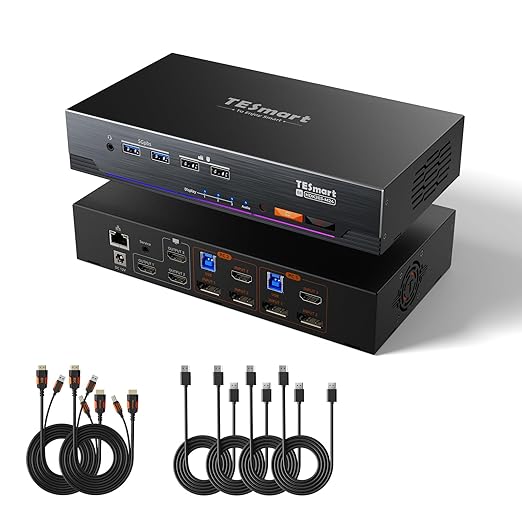
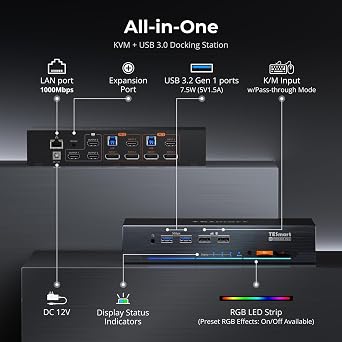
- Equipped with two sets of (HDMI + DP + DP+USB-B) Input ports and three HDMI Output ports to enabling extended triple-monitor display across three connected PCs
- 12-bit Color for Gaming & Editing - Ensures precise 8K/4K editing and stable, tear-free, ghost-free visuals in advanced gaming with the KVM Switch Gaming Dock for 2 PCs & 3 Monitors, compatible with both Nvidia and AMD graphics cards
- Supports resolutions up to 8K@60Hz - Backward compatible with 4K@60Hz/120Hz/144Hz - DSC technology enables transmission of 7680x4320@60Hz 4:4:4 and 3840x2160@144Hz resolutions
- Gigabit Ethernet - Enables both PCs connected to the KVM switch to share a single Ethernet cable for network access
- EDID Emulators - Each input port has an EDID emulator, ensuring your computers always receive the correct display information, eliminating the need for constant display settings adjustments
- Ideal KVM for Gaming - Supports Dynamic HDR (HDR10+, Dolby Vision) for improved color accuracy and realistic visuals. Features VRR, FVA, and ALLM to reduce screen tearing, stuttering, and input lag, ensuring a smoother gaming experience
- Switching Made Easy - Choose from 4 convenient switching options: customizable keyboard hotkeys, front panel button, mouse wheel, and IR remote (AAA batteries not included). Easily switch between sources and manage your devices
| Connector Type Used on Cable | Plug In |
| Compatible Devices | Computers (Windows, Linux, MacOS), Graphics Cards (Nvidia, AMD), Monitors |
| Cable Type | HDMI, DisplayPort |
| Number of Ports | 7 |
| Color | Black |
| Brand | TESmart |
| Manufacturer | TESmart |
| Mfr Part Number | HDK203-M24-USBK |
| Model Number | HDK203-M24-USBK |
| Unit Count | 1.0 Count |
| Built-In Media | 1x KVM Switch, 2x HDMI+USB Cables, 4x DP Cables, 1x Remote, 1x Adapter, Manual |
| Connector Type | Plug In |
| Country of Origin | This item will be imported from US |
| Item Weight | 3 lbs (1.36 kg) |
What's in the box
1x KVM Switch, 2x HDMI+USB Cables, 4x DP Cables, 1x Remote, 1x Adapter, Manual
Who Should Buy?

-
Gamers
Supports high refresh rates and resolutions, ideal for intense gaming scenarios with multiple monitor setups.
-
Content Creators
Perfect for professionals using multiple screens for video editing, graphic design, or coding tasks efficiently.
-
IT Professionals
Allows easy switching between computers, making it suitable for tech support and network management roles.

-
Casual Users
Basic users may not need advanced features, making this switch overly complex and unnecessary for simple tasks.
-
Budget-Conscious Shoppers
This product may be pricey compared to simpler options, not suitable for those looking to save money.
-
Single Monitor Users
Not suitable for users with a single monitor setup, as its features focus on multiple display environments.
Product Description
Have any Query? Chat with us
Customer Questions & Answers
-
Question:
What is the maximum resolution supported by the TESmart KVM Switch?
Answer: The TESmart KVM Switch supports up to 8K@60Hz resolution for a single monitor when using DP 1.4 and 4K@144Hz for dual display configurations. This high resolution makes it ideal for gaming and graphic-intensive tasks, ensuring crisp and clear visuals. Whether you're a gamer looking to elevate your performance with high FPS or a professional relying on sharp image quality for design work, this KVM switch meets diverse needs efficiently. -
Question:
How does the TESmart KVM Switch handle multiple computers?
Answer: This KVM switch allows you to control up to two computers with three monitors simultaneously, making it easy to switch between systems with just a press of a button. Such functionality is particularly useful for users working on different projects or who need to monitor multiple tasks concurrently. It enhances productivity by minimizing the need for multiple sets of peripherals and screens, streamlining workflows for multitasking professionals. -
Question:
What ports are included in the TESmart KVM Switch?
Answer: The TESmart KVM Switch features HDMI 2.1 and DisplayPort 1.4 ports, alongside USB 3.0 connections. This variety allows for compatibility with a wide range of devices, including modern GPUs and other peripherals. Enhanced data transfer rates through USB 3.0 also facilitate quicker access to external drives and accessories, making it a versatile solution for both gaming and professional environments where speed and connectivity are vital. -
Question:
Can I use this KVM Switch for gaming?
Answer: Absolutely! The TESmart KVM Switch is designed with gamers in mind, supporting resolutions up to 4K@144Hz. This ensures smooth and responsive gameplay, crucial for competitive gaming. By allowing quick switching between computers, players can seamlessly transition from gaming to streaming or other activities without the hassle of changing cables. Its ability to handle high refresh rates also helps deliver a lag-free experience. -
Question:
Is it easy to switch between computers using the TESmart KVM Switch?
Answer: Yes, switching between computers is straightforward with the TESmart KVM Switch. Users can toggle between systems using the physical button located on the unit or through keyboard shortcuts. This seamless switching is especially beneficial for users who frequently switch contexts, such as gamers who manage streams, or business professionals switching between workstations without the hassle of reconnecting devices. -
Question:
Does the TESmart KVM Switch require software installation?
Answer: No, the TESmart KVM Switch is a plug-and-play device, meaning no additional software installation is required. It offers effortless setup, allowing users to connect their devices and start using the switch immediately. This feature is advantageous for users who prefer a hassle-free experience and don't want to spend time on complex configurations before enjoying their devices. -
Question:
What types of devices can I connect to this KVM Switch?
Answer: You can connect a variety of devices, including desktop computers, laptops, gaming consoles, and monitors, to the TESmart KVM Switch. Its versatile connectivity options ensure that you can manage multiple systems from a single set of monitors and peripherals. This flexibility is ideal for gamers with specific hardware setups and professionals needing to control multiple workstations without clutter. -
Question:
What is the distance limitation for the HDMI and DisplayPort cables?
Answer: For optimal performance, it is recommended to keep HDMI cables under 15 feet and DisplayPort cables under 10 feet. Longer cables may impact signal quality and overall performance. Ensuring appropriate cable lengths when setting up your system can help maintain high-definition visuals and stable connectivity, particularly important in gaming or design setups where clarity is crucial. -
Question:
Can I use this KVM Switch with my existing peripherals?
Answer: Yes! The TESmart KVM Switch works with existing peripherals, such as keyboards, mice, and monitors, providing flexibility and ease of integration with your current setup. Users can connect their preferred devices without needing to buy new ones. This feature is especially useful for those who have already invested in high-quality equipment and want to streamline their workstation while retaining their favorite peripherals. -
Question:
Where can I buy the TESmart 4K@144Hz Displayport HDMI KVM Switch?
Answer: You can purchase the TESmart 4K@144Hz Displayport HDMI KVM Switch from Ubuy in Ethiopia. Ubuy offers a wide selection of products along with international shipping options, making it easy for customers in Ethiopia to access this innovative KVM switch. Providing efficient service and competitive pricing, Ubuy stands out as a reliable platform for all your tech needs, ensuring a seamless shopping experience.
TESmart KVM Switches HDK203-M24-USBK Editorial Review
** TESmart 4K@144Hz KVM Switch** The TESmart 4K@144Hz Displayport + HDMI KVM Switch has emerged as a highly regarded solution for users needing to manage multiple computers and monitors seamlessly. With its capability to handle two computers and three high-resolution monitors, this KVM switch appeals primarily to gamers and professionals who require high performance and fluid transitions between devices. Customer feedback highlights the device's robust build quality, praised for its sleek all-metal design, suggesting longevity and durability. Users have lauded the swift switching speed, noting minimal latency during transitions, which enhances the overall user experience. This responsiveness is particularly appreciated by individuals working long hours, as seamless transitions can significantly improve productivity. One standout feature is the implementation of hotkey commands, which many users found to be intuitive and efficient. The plug-and-play compatibility with various keyboards and mice adds to the convenience, reducing the hassle of complex setup processes. Importantly, the KVM switch maintains excellent graphic quality even under demanding settings, such as running three 4K monitors at 120Hz, a critical aspect for gaming and high-resolution tasks. However, the product is not without its criticisms. A common complaint centers around the noisy cooling fan, which some users find distracting, despite the functionality it serves. There is a suggestion for the manufacturer to Consider a higher-quality, quieter fan in future iterations. Additionally, some users expressed a desire for improved feedback from the physical buttons for the power and switching functions, although many prefer using the hotkeys instead. Furthermore, buyers have noted the need for better documentation related to the KVM's capabilities and the technicalities behind its performance metrics. This lack of clarity could be a barrier for those seeking to fully understand and leverage the device's features. Overall, the TESmart KVM switch seems to be a strong contender in its market segment, especially for those who prioritize performance and value. With its effective performance and positive reception, it offers a compelling option for anyone looking for a reliable KVM solution, especially Considering its competitive price. **
Customer Reviews & Ratings
43 customers ratings
-
5 Star
54%
-
4 Star
13%
-
3 Star
8%
-
2 Star
13%
-
1 Star
12%
Review this product
Share your thoughts with other customers
Pros
- Excellent build quality with a sleek design
- Fast switching speed with minimal latency
- User-friendly hotkey commands
- Good compatibility with various peripherals
- Maintains graphic quality under high demand
Cons
- Cooling fan can be noisy
Product Price History
Important information
- Limitations : For products shipped internationally, please note that any manufacturer warranty may not be valid; manufacturer service options may not be available; product manuals, instructions, and safety warnings may not be in destination country languages; the products (and accompanying materials) may not be designed in accordance with destination country standards, specifications, and labeling requirements; and the products may not conform to destination country voltage and other electrical standards (requiring use of an adapter or converter if appropriate). The recipient is responsible for assuring that the product can be lawfully imported to the destination country. When ordering from Ubuy or its affiliates, the recipient is the importer of record and must comply with all laws and regulations of the destination country.
- Not all the products listed on Ubuy are for sale, as Ubuy is a global search engine. Products are subject to export/trade regulations.
ETB 124155
Order now and get it around Thursday, July 02
This item is not restrict in my country.(Please click on above link if this item is not restrict in your country, So our team will review and allow.)
QTY:
Only 12 items left in stock.
Secured transaction
Ubuy works hard to protect your security and privacy. Our advanced payment security system ensures confidentiality by encrypting your information during transmission using AES (Advanced Encryption Standards) and SSL (Secure Socket Layer) protocols. Your payment details are 100% secure as we do not share your payment details with third party sellers.
Our Top Logistics Partners
Fastest cross-border delivery
Features & Benefits
- Supports stunning 8K@60Hz resolution for unmatched clarity.
- Backward compatible with 4K at multiple high refresh rates.
- Dynamic HDR and VRR for enhanced gaming visuals.
- Easy switching options with customizable hotkeys and remote control.
- Gigabit Ethernet allows shared network access for connected devices.
- Perfect solution for home office, creative design, and entertainment.