0 ratings

Item #:
83841456
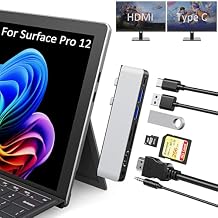
Surface Pro 12 Docking Station, Surface Pro 12 Accessories with 4K HDMI, Thunerbolt 4 Hub (4K@60Hz Display+ 40Gbps Data+ 100W Charging), 2 USB3.0,
Item #:
83841456
ETB 4739
Price Details
Excluding Shipping & Custom charges ( Shipping and custom charges will be calculated on checkout )
*All items will import from US
0 ratings
Write a review
In stock
 Imported from USA store
QTY:
Order now and get it around Tuesday, June 23
Secured transaction
Ubuy works hard to protect your security and privacy. Our advanced payment security system ensures confidentiality by encrypting your information during transmission using AES (Advanced Encryption Standards) and SSL (Secure Socket Layer) protocols. Your payment details are 100% secure as we do not share your payment details with third party sellers.
Our Top Logistics Partners


Expand your Surface ports into 2 USB2.0 + 1 USB 3.0 + 1 HDMI(4K@30Hz) and SD/TF card reader with our specially designed USB Hub Adapter.

Fast
Shipping

Free
Return*

Secure Packaging

100% Original Products

PCI DSS Compliance

ISO 27001 Certified


Note: Step Down Voltage Transformer required for using electronics products of US store (110-120). Recommended power converters Buy Now.


What Stands Out
Multiport Functionality
This docking station offers multiple ports, including USB 3.0, HDMI, and SD/TF slots, expanding connectivity options for Microsoft Surface Pro devices, enhancing productivity for professionals on the go.
4K HDMI Output
Supports 4K@30Hz HDMI output, ensuring high-resolution display capabilities for presentations or multimedia projects, making it ideal for creative professionals who require high-quality visual performance.
User-Friendly Design
The compact and lightweight design makes this hub portable and easy to use, providing a seamless docking experience for Microsoft Surface Pro 4, 5, and 6 users, addressing workspace constraints effectively.
Product Details
| Item Weight | 0.5 lbs (230 grams) |
Who Should Buy?

-
Professionals
Ideal for users needing multiple connections for productivity, such as designers or video editors using Surface devices.
-
Media Enthusiasts
Perfect for users who work with high-resolution displays or require enhanced video output via the HDMI connection.
-
Frequent Travelers
Great for users who need a compact multiport solution for connectivity on the go, simplifying their workspace.

-
Casual Users
May not be suitable for basic users who do not require multiple ports or high-performance capabilities.
-
Limited Device Compatibility
Not ideal for users with devices other than Surface Pro 4, 5, or 6, as compatibility is restricted.
-
High-Performance Gamers
Gamers may find it lacks the necessary specifications for high-end gaming requirements, especially for low latency.
Product Description
Surface Pro 12 Docking Station, Surface Pro 12 Accessories with 4K HDMI, Thunerbolt 4 Hub (4K@60Hz Display+ 40Gbps Data+ 100W Charging), 2 USB3.0, SD/TF, 3.5mm Audio for Surface Pro 12 inch 2025
Have any Query? Chat with us
Customer Questions & Answers
-
Question:
What compatibility do I have with the Microsoft Surface Dock for my devices?
Answer: The Microsoft Surface Dock is designed to be compatible with a wide range of Surface devices including Surface Pro models 3 through 11 and Surface Laptop models. This docking station allows users to seamlessly connect their Surface devices to multiple displays and peripherals, enhancing productivity. Additionally, the docking station's range of ports, including VGA and dual HDMI outputs, enables extended screen setups, which is ideal for presentations or multitasking. By connecting to the Surface Dock, users can transform a single Surface device into a powerful workstation. -
Question:
Can I use the Microsoft Surface Dock to connect multiple monitors?
Answer: Yes, the Microsoft Surface Dock supports connecting up to three displays simultaneously, including two HDMI monitors and one VGA monitor. This feature is particularly advantageous for professionals who require a multi-monitor setup for tasks like graphic design, data analysis, or programming. The dual HDMI outputs can easily connect to high-resolution monitors, ensuring crisp visuals and improved workspace efficiency. This makes the Surface Dock an excellent choice for users looking to optimize their desk setup. -
Question:
What ports are included in the Microsoft Surface Dock, and what are their functions?
Answer: The Microsoft Surface Dock features 12 ports, including two HDMI ports, one VGA port, three USB 3.0 ports, one Ethernet port, and a Surface Connect port. Each port serves a distinct purpose; for example, the HDMI and VGA ports allow for video output to external monitors, while the USB 3.0 ports enable connections to various peripherals such as keyboards, mice, and external hard drives. The Ethernet port provides a reliable wired internet connection, enhancing connectivity for online tasks. This diverse range of ports allows users to create a fully equipped workstation. -
Question:
How does the Microsoft Surface Dock improve the overall productivity of Surface users?
Answer: The Microsoft Surface Dock significantly enhances productivity by streamlining the connection of multiple devices and peripherals. With the ability to simultaneously connect various monitors and accessories, users can easily transition between tasks without the need for multiple cables or setups. This streamlined connection facilitates a clutter-free workspace that promotes focus and efficiency. For example, office workers can connect their Surface device to a larger display for presentations and switch back to a laptop mode for on-the-go use, adding versatility to their daily workflows. -
Question:
Is the Microsoft Surface Dock portable for travel purposes?
Answer: While the Microsoft Surface Dock is designed for desktop use to provide comprehensive connectivity, it is relatively portable. This makes it suitable for users who travel for work or need to set up their workspace in different locations. Although it is not as compact as a standard USB-C hub, its lightweight design allows it to fit in a backpack alongside your Surface device. As a result, whether you’re visiting client sites or attending conferences, the dock provides flexibility in setting up your workspace efficiently. -
Question:
Can the Microsoft Surface Dock charge my Surface device while in use?
Answer: Yes, the Microsoft Surface Dock can charge your Surface device while connected. This is achieved through the Surface Connect port, which allows for power delivery directly from the dock. Consequently, users can enjoy uninterrupted use of their devices while ensuring they remain charged throughout the day. This feature is particularly beneficial for professionals who rely on their devices for extended periods, as it eliminates the need for separate charging solutions and helps maintain productivity without interruptions. -
Question:
What kind of users can benefit from the Microsoft Surface Dock?
Answer: Various types of users can benefit from the Microsoft Surface Dock, including professionals in design, education, and business sectors. For instance, graphic designers can take advantage of multiple displays to enhance their creative workflow, while educators can easily connect laptops to projectors for classroom presentations. Additionally, remote workers can create an ergonomic and efficient workspace at home by using the dock to connect their Surface devices to all necessary peripherals. Overall, its versatile applications make it an excellent tool for enhancing productivity across professions. -
Question:
How does the Surface Dock compare to other docking stations on the market?
Answer: The Surface Dock stands out due to its specific compatibility with Surface devices and the seamless integration of multiple display outputs. Unlike generic docking stations, it offers tailored features such as dedicated ports for Surface Connect and high-quality video outputs designed specifically for Surface devices. This tailored connection ensures that users maximize the performance of their devices, making it an ideal choice for anyone heavily reliant on a Surface for their daily tasks. -
Question:
What is the installation process for the Microsoft Surface Dock?
Answer: Setting up the Microsoft Surface Dock is straightforward and user-friendly. Simply connect the dock to your Surface device using the Surface Connect cable and plug it into a power outlet. After that, you can connect your peripherals, including monitors, USB devices, and Ethernet cables, to the respective ports on the dock. No extensive configuration is required; most devices will automatically detect the dock and adjust settings accordingly. This ease of installation makes it accessible for all users, regardless of their technical expertise. -
Question:
Where can I buy the Microsoft Surface Dock in Ethiopia?
Answer: You can purchase the Microsoft Surface Dock at Ubuy, where you’ll find a reliable selection of technology products tailored for your needs. Ubuy provides an easy browsing experience and convenient purchasing options, ensuring you have access to this essential accessory for your Surface devices. With Ubuy's focus on quality products, you can be assured of the right choice for your productivity enhancements.
clickfish Docking Stations Editorial Review
The docking station has received varied but generally positive reviews from customers. Many users found it to be exactly what they needed, providing extra ports for connecting various devices to their Surface Pro. Some customers appreciated the convenience it offered when travelling, such as backing up vacation photos to external SSD drives. The docking station was also praised for its functionality when connecting to external monitors like the Samsung curve monitor. Users noted that it worked well with their devices and enabled seamless connectivity. However, a common concern among users was the durability of the docking station, with worries about it potentially snapping off or damaging the tablet if not handled carefully. Despite this, many found the docking station to be a useful and effective tool for expanding the connectivity options of their Surface Pro. **
Customer Reviews & Ratings
1 customers ratings
-
5 Star
100%
-
4 Star
0%
-
3 Star
0%
-
2 Star
0%
-
1 Star
0%
Review this product
Share your thoughts with other customers
Pros
- Provides extra ports for connecting various devices
- Convenient for travel and backups
- Works well with external monitors
- Enables seamless connectivity with Surface Pro
- Useful and effective for expanding device connectivity
Cons
- Durability concerns about potential damage to tablet if not handled carefully
Product Price History
Important information
- Limitations : For products shipped internationally, please note that any manufacturer warranty may not be valid; manufacturer service options may not be available; product manuals, instructions, and safety warnings may not be in destination country languages; the products (and accompanying materials) may not be designed in accordance with destination country standards, specifications, and labeling requirements; and the products may not conform to destination country voltage and other electrical standards (requiring use of an adapter or converter if appropriate). The recipient is responsible for assuring that the product can be lawfully imported to the destination country. When ordering from Ubuy or its affiliates, the recipient is the importer of record and must comply with all laws and regulations of the destination country.
- Not all the products listed on Ubuy are for sale, as Ubuy is a global search engine. Products are subject to export/trade regulations.
ETB 4739
Order now and get it around Tuesday, June 23
This item is not restrict in my country.(Please click on above link if this item is not restrict in your country, So our team will review and allow.)
QTY:
Secured transaction
Ubuy works hard to protect your security and privacy. Our advanced payment security system ensures confidentiality by encrypting your information during transmission using AES (Advanced Encryption Standards) and SSL (Secure Socket Layer) protocols. Your payment details are 100% secure as we do not share your payment details with third party sellers.
Our Top Logistics Partners
Fastest cross-border delivery
Features & Benefits
- Expand Surface Pro ports with multiple connections.
- Supports Super Speed USB 3.0 with 5Gbps transfer rate.
- 4K HDMI output for stunning displays on external monitors.
- Convenient SD/TF card reader for fast data access.
- Lightweight and portable design for on-the-go use.
- Compatible with Windows 11, 10, 8, 7, and XP systems.