



0 ratings
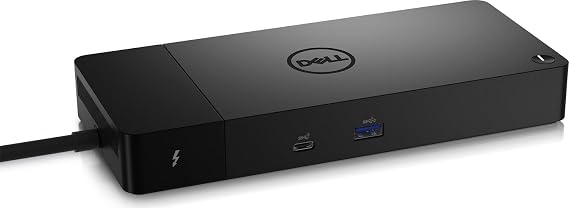
DELL WD22TB4 - Dockingstation
Dell Thunderbolt Dock – WD22TB4 offers wide compatibility across Dell Commercial laptops and notebooks from other manufacturers
DELL WD22TB4 - Dockingstation
Item #: 61380707

DELL WD22TB4 - Dockingstation

Item #: 61380707

ETB 52094

Price Details

Excluding Shipping & Custom charges ( Shipping and custom charges will be calculated on checkout )

*All items will import from US

0 ratings Write a review
In stock
us Imported from USA store

QTY:

Order now and get it around Sunday, July 12
Our Top Logistics Partners
  • fedex
  • dhl
Dell Thunderbolt Dock – WD22TB4 offers wide compatibility across Dell Commercial laptops and notebooks from other manufacturers
U-Care Warranty:
None
Select a Plan
fast shipping

Fast
Shipping

free return

Free
Return*

secure packaging

Secure Packaging

100% original products

100% Original Products

pci-dss

PCI DSS Compliance

iso certified

ISO 27001 Certified


paypal payment
visa payment
mastercard payment
Note: Step Down Voltage Transformer required for using electronics products of US store (110-120). Recommended power converters Buy Now.

What Stands Out

High-Speed Connectivity
The DELL WD22TB4 offers Thunderbolt 4 technology, delivering exceptional data transfer speeds and enabling multiple 4K displays, which enhances productivity for users in demanding environments.
Versatile Compatibility
This docking station supports a wide range of devices, making it ideal for professionals using various laptops while ensuring seamless integration with both Windows and macOS systems.
Power Delivery
With 90W power delivery, the dock charges laptops while connecting peripherals, eliminating the need for multiple chargers and keeping your workspace tidy and efficient.

Product Details

Explore a wide range of Thunderbolt docking stations with HDMI, DP, Thunderbolt, GigE DELL WD22TB4, and more at Ubuy Ethiopia. Enjoy fast, high-resolution connectivity!
  • Dell Thunderbolt Dock WD22TB4 180W
  • Supports HDMI, DP, and Thunderbolt connections
  • Features Thunderbolt Gigabit Ethernet for high-speed network connectivity
  • Provides up to 5120 x 2880 pixels resolution
  • Includes 10/100/1000 Mbits Ethernet support
  • Comes in a sleek black design
Item Weight3.6 lbs (1.63 kg)

Who Should Buy?

Suitable For
  • Remote Workers

    Provides multiple connectivity options and fast charging, streamlining workspace efficiency for remote workers.

  • Creative Professionals

    Ideal for graphic designers and video editors needing multiple display outputs and high-speed data transfer.

  • Business Users

    Fits seamlessly into corporate environments with various ports, enhancing productivity and collaboration.

Not Suitable For
  • Casual Users

    Basic users with minimal device needs may find it too advanced and not cost-effective.

  • Old Laptops

    Older model laptops may not support the high bandwidth or multiple ports featured in this docking station.

  • Frequent Travelers

    Not as portable as smaller options, making it less ideal for users who travel frequently.

Product Description

DELL WD22TB4 - Dockingstation

About This Item

Upgrade your workspace with the DELL Thunderbolt Docking Station, Gigabit Ethernet Adapter, and Thunderbolt Cable. This sleek and efficient docking station enables seamless connectivity with Thunderbolt, HDMI, and DisplayPort support, while the Gigabit Ethernet adapter ensures lightning-fast network speeds. The included Thunderbolt cable offers high-performance data transfer and supports resolutions up to 5120 x 2880 pixels.

With its modern black finish, this DELL Thunderbolt set is the perfect addition to your setup. Purchase yours today and experience the ultimate in connectivity and efficiency.

Have any Query? Chat with us

Customer Questions & Answers

  • Question: What is the DELL WD22TB4 docking station?

    Answer: The DELL WD22TB4 docking station is an advanced connectivity solution designed to enhance productivity by allowing users to connect multiple devices to their laptop or desktop with just one cable. It features Thunderbolt 4 technology, which provides high-speed data transfer, video output, and power delivery all through a single connection. Ideal for professionals who require seamless multitasking, this dock supports up to three 4K displays, making it perfect for design work, financial analysis, and other tasks that demand extensive screen real estate.
  • Question: How do I connect my devices to the DELL WD22TB4?

    Answer: Connecting your devices to the DELL WD22TB4 is straightforward. Start by plugging the Thunderbolt 4 cable into your compatible laptop. This single connection handles data, video, and power for connected devices. Next, connect your peripherals such as monitors, keyboards, and mice to the docking station's available ports. It supports HDMI, DisplayPort, USB-A, and USB-C connections, accommodating a wide range of devices. This setup is particularly useful in office environments where quick device switching is necessary.
  • Question: What ports are available on the DELL WD22TB4 docking station?

    Answer: The DELL WD22TB4 docking station offers a comprehensive array of ports, including two HDMI 2.0 ports, one DisplayPort 1.4, two USB-C ports (one for data, one for power delivery), and several USB-A ports for peripheral connectivity. Additionally, it includes an Ethernet port for wired network connections and an audio output jack. This variety makes it ideal for users needing to connect a combination of displays, storage devices, and network connections in a streamlined setup.
  • Question: Is the DELL WD22TB4 compatible with both Windows and Mac?

    Answer: Yes, the DELL WD22TB4 docking station is compatible with both Windows and Mac operating systems. It utilizes Thunderbolt technology, which is universally recognized by modern laptops across different brands. This versatility allows users to seamlessly switch between systems while maintaining high performance. It is particularly beneficial for users working in mixed OS environments, where both Mac and Windows laptops are prevalent, ensuring that everyone can benefit from the dock’s connectivity capabilities.
  • Question: Can I charge my laptop using the DELL WD22TB4 docking station?

    Answer: Absolutely! The DELL WD22TB4 docking station is designed to provide power delivery to your laptop while connected. This means that you can charge your compatible laptop while using it, eliminating the need for multiple power adapters. With its higher wattage output, it not only powers your essentials but also keeps your laptop fully charged throughout the workday. This feature is especially useful for professionals who are constantly on the go and require reliable power solutions at their desks.
  • Question: What is the maximum display resolution supported by the DELL WD22TB4?

    Answer: The DELL WD22TB4 docking station supports an impressive maximum display resolution of up to three 4K displays at 60 Hz. This high capability makes it ideal for professionals in graphic design, video editing, and gaming, where screen clarity and detail are paramount. By enabling multi-monitor setups, users can maximize their productivity, multitasking between applications effortlessly and enhancing their workflow through an expansive visual workspace.
  • Question: Does the DELL WD22TB4 support dual monitors?

    Answer: Yes, the DELL WD22TB4 supports dual monitor setups, which is a significant advantage for users who need more screen space for complex tasks. You can connect a combination of HDMI and DisplayPort monitors to utilize the dock's outputs. This functionality is beneficial for tasks such as programming, data analysis, or design work, where having multiple applications or datasets open simultaneously can significantly enhance efficiency and performance.
  • Question: What are the dimensions and weight of the DELL WD22TB4?

    Answer: The DELL WD22TB4 docking station is designed to be compact, with dimensions of approximately 8.31 x 3.37 x 1.09 inches and a lightweight construction that makes it easy to transport. This compact form factor ensures that it fits on most desks without taking up much space, while still providing all the necessary ports and features. Its portability makes it suitable for professionals who move between different work locations, such as remote workers or those who travel frequently.
  • Question: Is there a software required for the DELL WD22TB4 to function?

    Answer: The DELL WD22TB4 docking station generally does not require specific software to function. It operates largely on plug-and-play technology, meaning it will automatically be recognized by most compatible laptops upon connection. However, users may benefit from installing drivers provided by DELL for optimal performance and additional features. Ensuring your laptop's operating system is updated will further enhance compatibility and functionality, making this dock an efficient choice for users seeking a hassle-free integration.
  • Question: Where can I buy DELL WD22TB4 - Dockingstation?

    Answer: You can buy the DELL WD22TB4 docking station through Ubuy, which offers a wide selection of tech products, including Dell accessories. Ubuy provides a reliable platform for purchasing genuine DELL products, ensuring that you receive quality and support. With a user-friendly interface and extensive listings, Ubuy is a great option for finding the DELL WD22TB4 in Ethiopia.

Dell Webcams & VoIP Equipment Editorial Review

No editorial reviews found

Customer Reviews & Ratings

5.0
1 customers ratings
  • 5 Star
    100%
  • 4 Star
    0%
  • 3 Star
    0%
  • 2 Star
    0%
  • 1 Star
    0%

Review this product

Share your thoughts with other customers

Platform Trust & Buyer Confidence

trustpilot logo
4.3/5 9,000 + reviews
Read reviews
MT
Mohd
Verified buyer

“The product received very good packaging & safe…Thank You”

16 June 2026 · via Trustpilot
SJ
Shawati
Verified buyer

“Accurate delivery timing given”

16 June 2026 · via Trustpilot
YB
Youcef
Verified buyer

“Not madly expensive like I thought, and much quicker than promised.”

15 June 2026 · via Trustpilot
LM
Leila
Verified buyer

“Never dealt with Ubuy before, but everything worked out great. Seamless cross border purchasing and shipping. Thanks!”

6/7/2026 · via Trustpilot
KA
Kwame
Verified buyer

“The process was smooth, with clear communication and timelines. This was my 1st purchase and I am really impressed. I will definitely be coming back.”

12 June 2026 · via Trustpilot
Secure Checkout Global Delivery Easy Returns Genuine Products

Product Price History

Important information

  • Limitations : For products shipped internationally, please note that any manufacturer warranty may not be valid; manufacturer service options may not be available; product manuals, instructions, and safety warnings may not be in destination country languages; the products (and accompanying materials) may not be designed in accordance with destination country standards, specifications, and labeling requirements; and the products may not conform to destination country voltage and other electrical standards (requiring use of an adapter or converter if appropriate). The recipient is responsible for assuring that the product can be lawfully imported to the destination country. When ordering from Ubuy or its affiliates, the recipient is the importer of record and must comply with all laws and regulations of the destination country.
  • Not all the products listed on Ubuy are for sale, as Ubuy is a global search engine. Products are subject to export/trade regulations.